☰ Toyota Levin Turbo☰ فهرستAudio / Visual / Telematics › PARK ASSIST / MONITORING › PANORAMIC VIEW MONITOR SWITCH
RM3660EC
_56
Audio / Visual / Telematics
_080754
PARK ASSIST / MONITORING
_0611030
PANORAMIC VIEW MONITOR SWITCH
G
PARK ASSIST / MONITORING PANORAMIC VIEW MONITOR SWITCH INSPECTION
PROCEDURE

 84721B
1.INSPECT PANORAMIC VIEW MONITOR SWITCH
84721B
1.INSPECT PANORAMIC VIEW MONITOR SWITCH
a.
1.5,0.167 1.917,0.417
0.417,0.25
1.333,1.833 1.417,1.333
true
2.115,1.833 2.031,1.333
true
0.115,0.094 0.427,0.25
0.313,0.156
10
false
*a
1.208,1.854 1.615,2.052
0.406,0.198
10
false
D
2.104,1.854 2.417,2.01
0.313,0.156
10
false
E
1.573,0.208 2.188,0.406
0.615,0.198
10
false
I243
| *a | Component without harness connected
(Panoramic View Monitor Switch) |
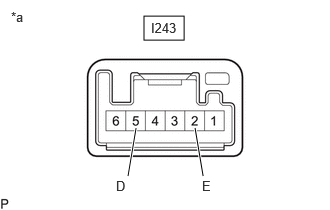
Measure the resistance according to the value(s) in the table below.
- Standard Resistance:
Tester Connection Switch Condition Specified Condition I243-5 (D) - I243-2 (E) Panoramic view monitor switch pushed Below 1 Ω Panoramic view monitor switch not pushed 10 kΩ or higher
If the result is not as specified, replace the panoramic view monitor switch.
b.
Check that the switch illumination illuminates.
i.
1.5,0.25 1.917,0.5
0.417,0.25
1.115,1.917 1.198,1.333
true
2.313,1.917 2.229,1.333
true
0.115,0.094 0.427,0.25
0.313,0.156
10
false
*a
1.021,1.938 1.396,2.094
0.375,0.156
10
false
ILL+
2.25,1.938 2.656,2.156
0.406,0.219
10
false
ILL-
1.583,0.292 1.958,0.448
0.375,0.156
10
false
I243
| *a | Component without harness connected
(Panoramic View Monitor Switch) |
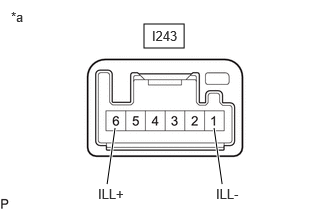
Apply auxiliary battery voltage to the panoramic view monitor switch and check that the switch illumination illuminates.
- OK:
Connection Specified Condition Auxiliary battery positive (+) → I243-6 (ILL+)
Auxiliary battery negative (-) → I243-1 (ILL-)Illuminates
If the result is not as specified, replace the panoramic view monitor switch.