EXTERIOR PANELS / TRIM NAME PLATE(for TFTM Made) INSTALLATION
CAUTION / NOTICE / HINT
- HINT:
-
When installing the name plates, heat the vehicle body, luggage compartment door panel and name plates using a heat light.
| Item | Temperature |
|---|---|
| Vehicle Body | 40 to 60°C (104 to 140°F) |
| Name Plate | 20 to 30°C (68 to 86°F) |
- CAUTION:
-
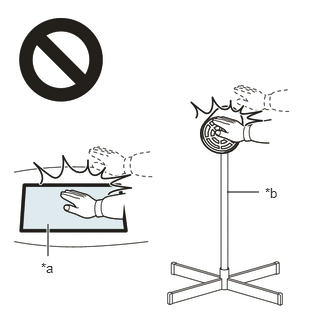 2.365,2 2.698,2 false 0.5,2.333 0.5,2.667 true 0.427,2.708 0.74,2.865 0.313,0.156 10 false *a 2.76,1.927 3.073,2.083 0.313,0.156 10 false *b
*a Heated Part *b Heat Light
- ·
Do not touch the heat light and heated parts, touching the heat light may result in burns.
·Touching heated parts for a long time may result in burns.
- NOTICE:
-
Do not heat the vehicle body, luggage compartment door panel or name plate excessively.
PROCEDURE

 75374
1.INSTALL SIDE PANEL EMBLEM (for HV Model)
75374
1.INSTALL SIDE PANEL EMBLEM (for HV Model)
Clean the vehicle body surface.
Using a heat light, heat the vehicle body surface.
Remove any remaining double-sided tape from the vehicle body.
Wipe off any tape adhesive residue with cleaner.
Using a heat light, heat the vehicle body and a new side panel emblem.
Remove the release paper from the side panel emblem.
- HINT:
-
After removing the release paper, keep the exposed adhesive free from foreign matter.
for LH Side:
Install the side panel emblem as shown in the illustration.
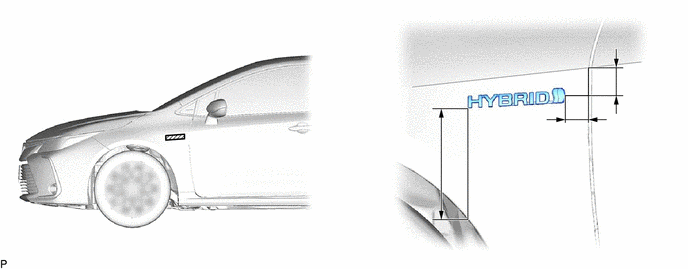
- Standard Measurement:
Area Measurement Area Measurement A 174.2 mm (6.86 in.) B 36.1 mm (1.42 in.) C 42.3 mm (1.67 in.) - -
- HINT:
-
Press the side panel emblem firmly to install it.
for RH Side:
Install the side panel emblem as shown in the illustration.
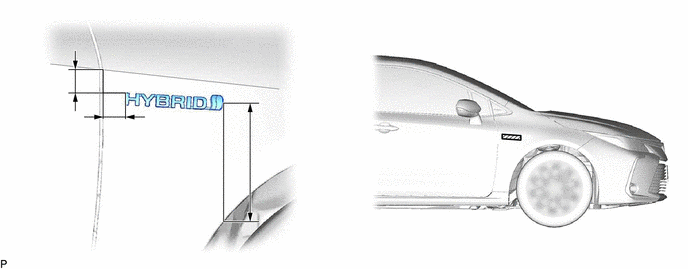
- Standard Measurement:
Area Measurement Area Measurement A 36.1 mm (1.42 in.) B 35.5 mm (1.40 in.) C 186.1 mm (7.33 in.) - -
- HINT:
-
Press the side panel emblem firmly to install it.
75445
2.INSTALL NO. 5 LUGGAGE COMPARTMENT DOOR NAME PLATE (for HV Model)
for ALLION:
Clean the luggage compartment door panel surface.
Using a heat light, heat the luggage compartment door panel surface.
Remove any remaining double-sided tape from the luggage compartment door panel.
Wipe off any tape adhesive residue with cleaner.
Using a heat light, heat the luggage compartment door panel and a new No. 5 luggage compartment door name plate.
Remove the release paper from the No. 5 luggage compartment door name plate.
- HINT:
-
After removing the release paper, keep the exposed adhesive free from foreign matter.
Install the No. 5 luggage compartment door name plate as shown in the illustration.
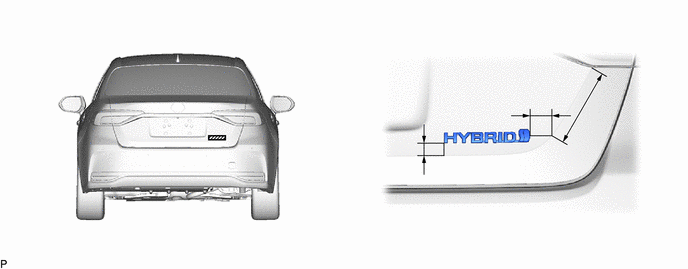
- Standard Measurement:
Area Measurement Area Measurement A 104.4 mm (4.11 in.) B 39.7 mm (1.56 in.) C 45.3 mm (1.78 in.) - -
- HINT:
-
Press the No. 5 luggage compartment door name plate firmly to install it.
75443A
3.INSTALL NO. 3 LUGGAGE COMPARTMENT DOOR PLATE (for HV Model)
for COROLLA:
Clean the luggage compartment door panel surface.
Using a heat light, heat the luggage compartment door panel surface.
Remove any remaining double-sided tape from the luggage compartment door panel.
Wipe off any tape adhesive residue with cleaner.
Using a heat light, heat the luggage compartment door panel and a new No. 3 luggage compartment door name plate.
Remove the release paper from the No. 3 luggage compartment door name plate.
- HINT:
-
After removing the release paper, keep the exposed adhesive free from foreign matter.
Install the No. 3 luggage compartment door name plate as shown in the illustration.
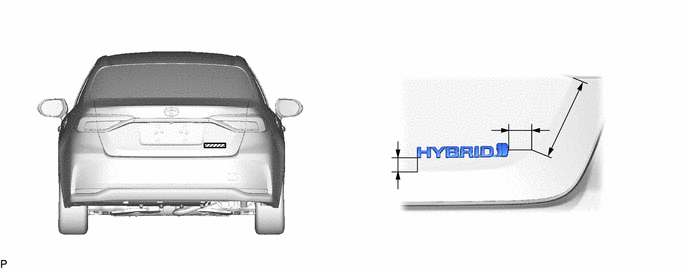
- Standard Measurement:
Area Measurement Area Measurement A 138.4 mm (5.45 in.) B 24.3 mm (0.957 in.) C 18.4 mm (0.724 in.) - -
- HINT:
-
Press the No. 3 luggage compartment door name plate firmly to install it.
75447
4.INSTALL NO. 7 LUGGAGE COMPARTMENT DOOR NAME PLATE (for COROLLA)
for NR Series Engine:
Clean the luggage compartment door panel surface.
Using a heat light, heat the luggage compartment door panel surface.
Remove any remaining double-sided tape from the luggage compartment door panel.
Wipe off any tape adhesive residue with cleaner.
Using a heat light, heat the luggage compartment door panel and a new No. 7 luggage compartment door name plate.
Remove the release paper from the No. 7 luggage compartment door name plate.
- HINT:
-
After removing the release paper, keep the exposed adhesive free from foreign matter.
Install the No. 7 luggage compartment door name plate as shown in the illustration.
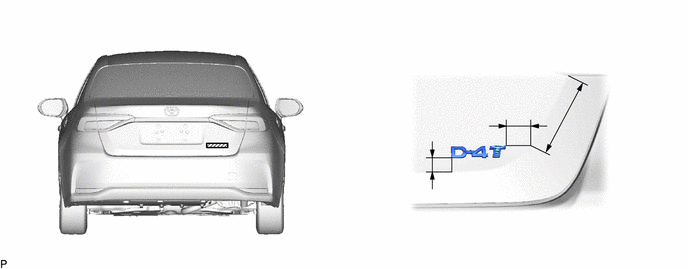
- Standard Measurement:
Area Measurement Area Measurement A 128.4 mm (5.06 in.) B 37.0 mm (1.46 in.) C 17.1 mm (0.673 in.) - -
- HINT:
-
Press the No. 7 luggage compartment door name plate firmly to install it.
75445
5.INSTALL NO. 5 LUGGAGE COMPARTMENT DOOR NAME PLATE (for Gasoline Model)
for ALLION:
Clean the luggage compartment door panel surface.
Using a heat light, heat the luggage compartment door panel surface.
Remove any remaining double-sided tape from the luggage compartment door panel.
Wipe off any tape adhesive residue with cleaner.
Using a heat light, heat the luggage compartment door panel and a new No. 5 luggage compartment door name plate.
Remove the release paper from the No. 5 luggage compartment door name plate.
- HINT:
-
After removing the release paper, keep the exposed adhesive free from foreign matter.
Install the No. 5 luggage compartment door name plate as shown in the illustration.
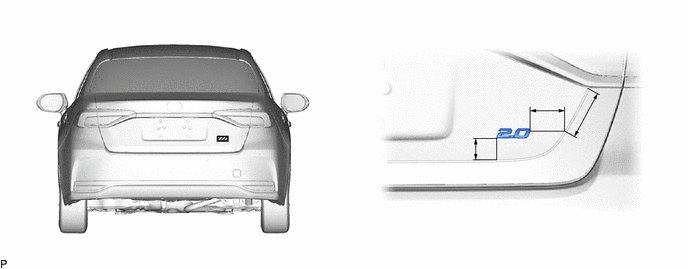
- Standard Measurement:
Area Measurement Area Measurement A 42.3 mm (1.67 in.) B 63.8 mm (2.51 in.) C 102.6 mm (4.04 in.) - -
- HINT:
-
Press the No. 5 luggage compartment door name plate firmly to install it.
75444
6.INSTALL NO. 4 LUGGAGE COMPARTMENT DOOR PLATE
Clean the luggage compartment door panel surface.
Using a heat light, heat the luggage compartment door panel surface.
Remove any remaining double-sided tape from the luggage compartment door panel.
Wipe off any tape adhesive residue with cleaner.
Using a heat light, heat the luggage compartment door panel and a new No. 4 luggage compartment door plate.
Remove the release paper from the No. 4 luggage compartment door plate.
- HINT:
-
After removing the release paper, keep the exposed adhesive free from foreign matter.
Install the No. 4 luggage compartment door plate as shown in the illustration.
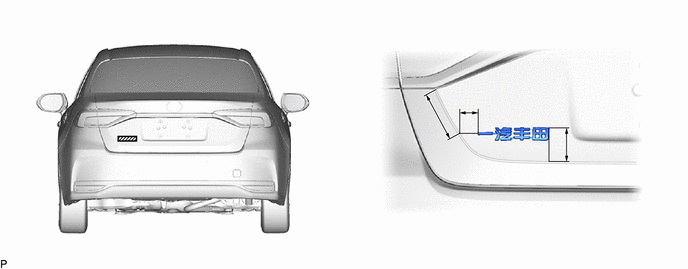
- Standard Measurement:
Area Measurement Area Measurement A 103.2 mm (4.06 in.) B 33.6 mm (1.32 in.) C 67.2 mm (2.65 in.) - -
- HINT:
-
Press the No. 4 luggage compartment door plate firmly to install it.
75442
7.INSTALL NO. 2 LUGGAGE COMPARTMENT DOOR NAME PLATE (for COROLLA)
Clean the luggage compartment door panel surface.
Using a heat light, heat the luggage compartment door panel surface.
Remove any remaining double-sided tape from the luggage compartment door panel.
Wipe off any tape adhesive residue with cleaner.
Using a heat light, heat the luggage compartment door panel and a new No. 2 luggage compartment door name plate.
Remove the release paper from the No. 2 luggage compartment door name plate.
- HINT:
-
After removing the release paper, keep the exposed adhesive free from foreign matter.
Install the No. 2 luggage compartment door name plate as shown in the illustration.
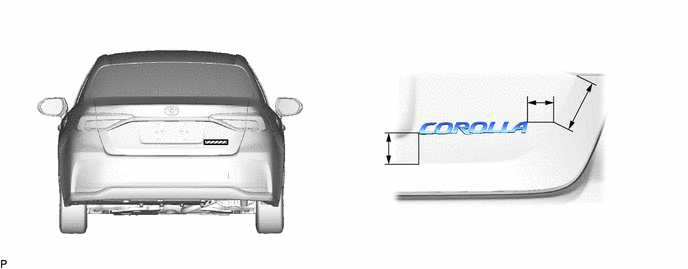
- Standard Measurement:
Area Measurement Area Measurement A 45.7 mm (1.8 in.) B 30.4 mm (1.2 in.) C 95.3 mm (3.75 in.) - -
- HINT:
-
Press the No. 2 luggage compartment door name plate firmly to install it.
75442
8.INSTALL NO. 2 LUGGAGE COMPARTMENT DOOR NAME PLATE (for ALLION)
Clean the luggage compartment door garnish surface.
Remove any remaining double-sided tape from the luggage compartment door panel.
Wipe off any tape adhesive residue with cleaner.
Using a heat light, heat a new No. 2 luggage compartment door name plate.
Remove the release paper from the No. 2 luggage compartment door name plate.
- HINT:
-
After removing the release paper, keep the exposed adhesive free from foreign matter.
Install the No. 2 luggage compartment door name plate as shown in the illustration.
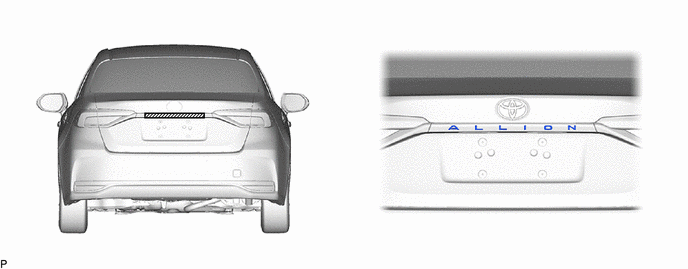
- HINT:
-
Press the No. 2 luggage compartment door name plate firmly to install it.
75741E
9.INSTALL SYMBOL EMBLEM
Clean the luggage compartment door panel surface.
Using a heat light, heat the luggage compartment door panel surface.
Remove any remaining double-sided tape from the luggage compartment door panel.
Wipe off any tape adhesive residue with cleaner.
Using a heat light, heat the luggage compartment door panel and a new symbol emblem.
Remove the release paper from the symbol emblem.
- HINT:
-
After removing the release paper, keep the exposed adhesive free from foreign matter.
Engage the 2 pins and install the symbol emblem as shown in the illustration.
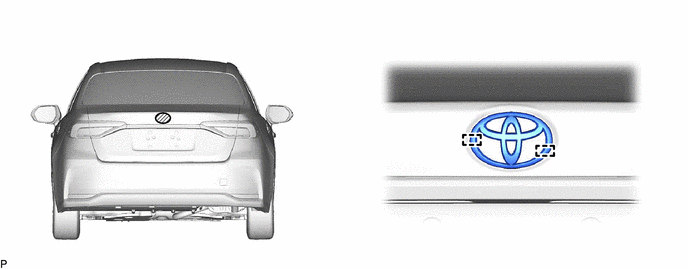
- HINT:
-
Press the symbol emblem firmly to install it.