TELEMATICS TELEMATICS SYSTEM(for Gasoline Model) OPERATION CHECK
MANUAL MAINTENANCE CHECK (for 10.25 Inch Display)
- HINT:
- ·
Using the manual maintenance check, it is possible to perform a maintenance check of the TOYOTA Connect device (inspection or repair of the device, or maintenance check after vehicle repair). Check if the customer is a registered member (when applying for or canceling the service, or changing the contract details). It is also possible to enable or disable the emergency call service.
·The screen illustrations provided are samples only and may be different from actual screens.
Check GPS Reception
Turn the engine switch on (IG) and wait 5 seconds for the red and green indicator lights on the emergency call switch panel to illuminate.
- HINT:
-
The purpose of the manual maintenance check is to check that vehicle location information can be sent correctly. Therefore, the manual maintenance check should be performed in a wide-open area where GPS radio waves can be received. Do not perform the check in an area between buildings or in an indoor environment such as a workshop.
Perform Manual Maintenance Check
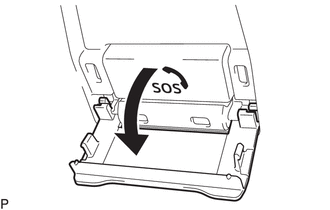
Open the emergency call switch panel cover.
Turn the engine switch on (IG).
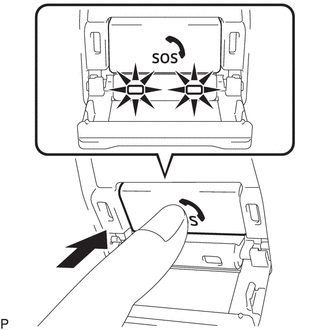
Press and hold the emergency call switch immediately after the red and green indicators come on.
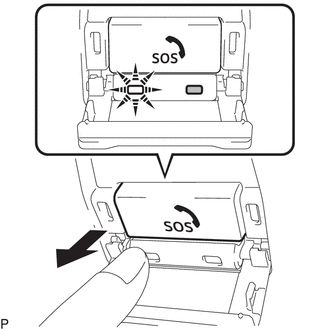
After the manual maintenance check starts, the green indicator will start blinking. Release the emergency call switch immediately after the green indicator starts blinking.
The system starts accessing the TOYOTA Connect Center.
After connecting to the TOYOTA Connect Center, data communication is first performed to check where the vehicle is, that a manual maintenance check is being performed, and that the customer is registered to the TOYOTA Connect Center.
After data communication is completed, the system enters call mode.
Try to talk to the TOYOTA Connect Center operator through the microphone to check that a call can be made normally and the call location is correct.
Finish the manual maintenance check after the call to the TOYOTA Connect Center operator ends.
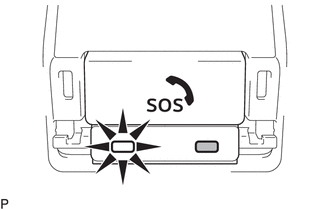
Check that the green indicator is illuminated.
- HINT:
-
If the manual maintenance check cannot be finished normally, perform troubleshooting indicated by Problem Symptoms Table (performing "TOYOTA Connect Center cannot be accessed even after a manual maintenance check is performed").
MANUAL MAINTENANCE CHECK (except 10.25 Inch Display)
- HINT:
- ·
Using the manual maintenance check, it is possible to perform a maintenance check of the TOYOTA Connect device (inspection or repair of the device, or maintenance check after vehicle repair). Check if the customer is a registered member (when applying for or canceling the service, or changing the contract details). It is also possible to enable or disable the emergency call service.
·The screen illustrations provided are samples only and may be different from actual screens.
Check GPS Reception
Turn the engine switch on (IG) and wait 5 seconds for the red and green indicator lights on the emergency call switch panel to illuminate.
- HINT:
-
The purpose of the manual maintenance check is to check that vehicle location information can be sent correctly. Therefore, the manual maintenance check should be performed in a wide-open area where GPS radio waves can be received. Do not perform the check in an area between buildings or in an indoor environment such as a workshop.
Perform Manual Maintenance Check
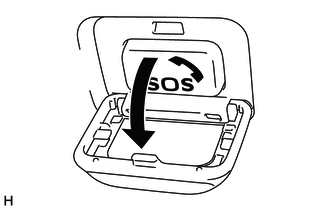
Open the emergency call switch panel cover.
Turn the engine switch on (IG).
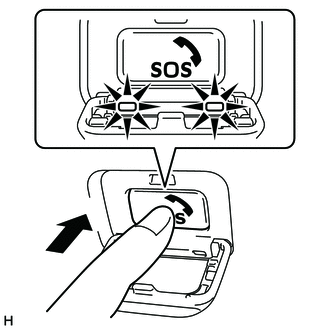
Press and hold the emergency call switch immediately after the red and green indicators come on.
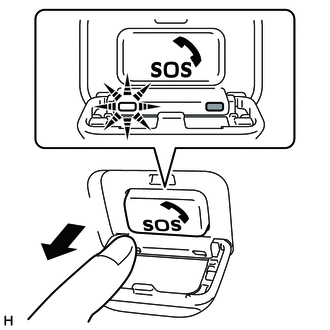
After the manual maintenance check starts, the green indicator will start blinking. Release the emergency call switch immediately after the green indicator starts blinking.
The system starts accessing the TOYOTA Connect Center.
After connecting to the TOYOTA Connect Center, data communication is first performed to check where the vehicle is, that a manual maintenance check is being performed, and that the customer is registered to the TOYOTA Connect Center.
After data communication is completed, the system enters call mode.
Try to talk to the TOYOTA Connect Center operator through the microphone to check that a call can be made normally and the call location is correct.
Finish the manual maintenance check after the call to the TOYOTA Connect Center operator ends.
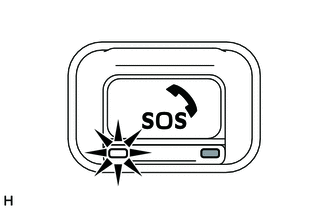
Check that the green indicator is illuminated.
- HINT:
-
If the manual maintenance check cannot be finished normally, perform troubleshooting indicated by Problem Symptoms Table (performing "TOYOTA Connect Center cannot be accessed even after a manual maintenance check is performed").