INTERIOR PANELS / TRIM FRONT CONSOLE BOX DISASSEMBLY
PROCEDURE

 1.REMOVE CONSOLE PLATE
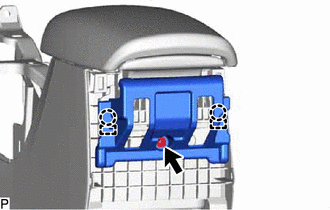
Remove the screw.
Disengage the 2 claws and 2 guides to remove the console plate.
58905
2.REMOVE CONSOLE COMPARTMENT DOOR SUB-ASSEMBLY

Remove the 4 screws and console compartment door sub-assembly.
85530
3.REMOVE NO. 1 POWER OUTLET SOCKET ASSEMBLY (w/ Power Outlet Socket)
85535B
4.REMOVE NO. 1 POWER OUTLET SOCKET COVER (w/ Power Outlet Socket)
58911G
5.REMOVE NO. 1 BOX PANEL (w/ Power Outlet Socket)
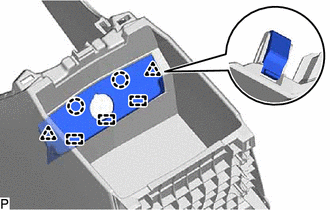
Disengage the 2 claws, 2 clips and 3 guides to remove the No. 1 box panel.
58959B
6.REMOVE CONSOLE COMPARTMENT DOOR CUSHION
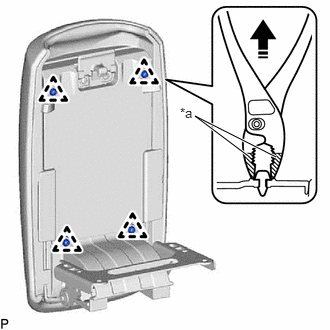
| *a | Protective Tape |

|
Remove in this Direction |
Using pliers, disengage the 4 clips as shown in the illustration to remove the 4 console compartment door cushions.
- HINT:
-
Tape the tips of pliers before use.
58908A
7.REMOVE CONSOLE COMPARTMENT DOOR LOCK SUB-ASSEMBLY
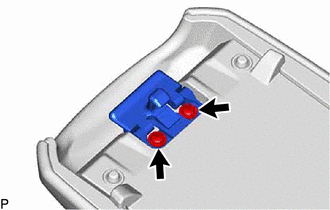
Remove the 2 screws and console compartment door lock sub-assembly.
58951D
8.REMOVE OUTER CONSOLE COMPARTMENT DOOR
for Type A:
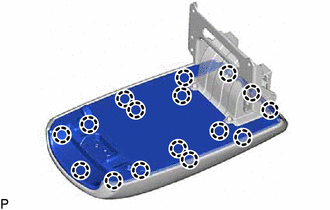
Disengage the 16 claws to remove the console compartment door female hinge.
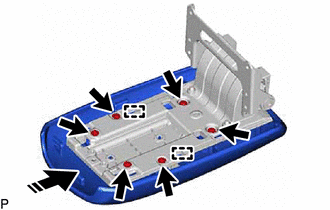
|
|
Remove in this Direction |
Remove the 6 screws.
Disengage the 2 guides as shown in the illustration to remove the outer console compartment door from the console compartment male hinge.
for Type B:
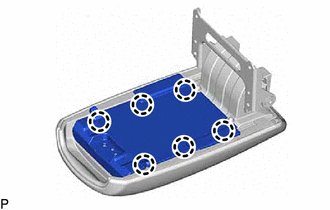
Disengage the 6 claws to remove the console compartment door female hinge.

|
|
Remove in this Direction |
Remove the 2 bolts.
Disengage the 2 guides as shown in the illustration to remove the console compartment male hinge.
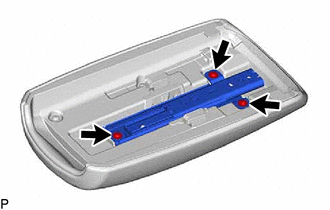
Remove the 3 screws and console compartment retainer sub-assembly.
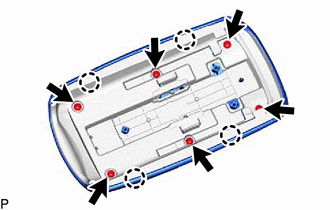
Remove the 6 screws.
Disengage the 4 claws to remove the outer console compartment door from the console compartment door moulding cover.