AUDIO / VIDEO AUDIO AND VISUAL SYSTEM(for Gasoline Model with Radio and Display Type (except 10.25 Inch Display)) SYSTEM DESCRIPTION
USB AUDIO SYSTEM FUNCTION OUTLINE
The radio and display receiver assembly is equipped with a USB connector. Connecting a USB device or "iPod" to the radio and display receiver assembly allows music files to be played. Not only is it possible to play music from a USB device with audio functions, it is also possible to play MP3 or AAC music files that are stored on a USB device. In addition, "iPod" control software is installed, allowing file selection from playlists and operation using shuffle mode.
USB audio system compatible devices
USB device (w/o "Apple CarPlay" Function)
The following device formats can be used:
| Compatible USB device formats | ·
USB communication format: USB 2.0 HS (480 Mbps) and FS (12 Mbps) ·
File format: FAT32 (Windows) ·
Class: Mass storage class |
MP3, WMA or AAC files written to a USB device with any format other than those listed above may not be played correctly, and their names and folder names may not be displayed correctly.
Items related to standards and limitations are as follows:
Maximum directory hierarchy: 8 levels
Maximum number of folders in device: 3000
Maximum number of files in device: 9999
USB device (w/ "Apple CarPlay" Function)
The following device formats can be used:
| Compatible USB device formats | ·
USB communication format: USB 2.0 HS (480 Mbps) ·
File format: FAT32 (Windows) ·
Class: Mass storage class |
MP3, WMA or AAC files written to a USB device with any format other than those listed above may not be played correctly, and their names and folder names may not be displayed correctly.
Items related to standards and limitations are as follows:
Maximum directory hierarchy: 8 levels
Maximum number of folders in device: 3000
Maximum number of files in device: 9999
"iPod"
"iPhone", "iPod nano" and "iPod touch" are trademarks of Apple Inc., registered in the U.S. and other countries.
The following "iPhone", "iPod nano" and "iPod touch" devices can be used with this system.
Made for:
"iPhone 11"
"iPhone 11 Pro"
"iPhone 11 Pro Max"
"iPhone XS"
"iPhone XS Max"
"iPhone XR"
"iPhone X"
"iPhone 8 plus"
"iPhone 8"
"iPhone 7"
"iPhone 7 Plus"
"iPhone SE"
"iPhone 6s"
"iPhone 6s plus"
"iPhone 6"
"iPhone 6 Plus"
"iPhone 5s"
"iPod touch" (6th generation)
"iPod touch" (5th generation)
"iPod nano" (7th generation)
- HINT:
-
Depending on differences between models or software versions etc., some models might be incompatible with this system.
USB VIDEO SYSTEM FUNCTION OUTLINE (w/o "Apple CarPlay" Function)
The radio and display receiver assembly is equipped with a USB connector. Connecting a USB device to the radio and display receiver assembly allows video files to be played. Not only is it possible to play video from a USB device with video functions, it is also possible to play MPEG-4 or H.264 video files that are stored on a USB device.
- HINT:
-
Operation through the controls of a USB device cannot be performed while it is connected.
Playable video file standards
| File extension | Compatible frame rates |
|---|---|
| .rm, .rmvb | Maximum 1080 p/30 fps |
| .mp4 | |
| .avi | |
| .wmv | |
| .flv |
File names
Only files with an extension of ".rm", ".rmvb", ".mp4", ".avi", ".wmv" and ".flv" can be recognized and played as MPEG-4 or H.264 files.
Save MPEG-4 or H.264 files with an extension of ".rm", ".rmvb", ".mp4", ".avi", ".wmv" and ".flv"
- NOTICE:
-
If non-MPEG-4 or non-H.264 files are saved with an extension of ".rm", ".rmvb", ".mp4", ".avi", ".wmv" and ".flv", those files may be wrongly recognized as MPEG-4 or H.264 files and played. A loud noise may occur and damage to the speakers may result.
USB VIDEO SYSTEM FUNCTION OUTLINE (w/ "Apple CarPlay" Function)
The radio and display receiver assembly is equipped with a USB connector. Connecting a USB device to the radio and display receiver assembly allows video files to be played. Not only is it possible to play video from a USB device with video functions, it is also possible to play MPEG-4, H.264, MPEG-4 AVC or WMV9 video files that are stored on a USB device.
- HINT:
-
Operation through the controls of a USB device cannot be performed while it is connected.
Playable video file standards
| File extension | Compatible frame rates |
|---|---|
| .mp4 | 1080 p/60i fps
1080 p/30p fps |
| .avi | |
| .3GP |
File names
Only files with an extension of ".mp4", ".avi" and ".3GP" can be recognized and played as MPEG-4, H.264, MPEG-4 AVC or WMV9 files.
Save MPEG-4, H.264, MPEG-4 AVC or WMV9 files with an extension of ".mp4", ".avi" and ".3GP".
- NOTICE:
-
If non-MPEG-4, non-H.264, non MPEG4-AVI or non WMV9 files are saved with an extension of ".mp4", ".avi" and ".3GP", those files may be wrongly recognized as MPEG-4, H.264, MPEG-4 AVC or WMV9 files and played. A loud noise may occur and damage to the speakers may result.
FILE INFORMATION OUTLINE (w/o "Apple CarPlay" Function)
Playable MP3 file standards
| Compatible standard | MPEG1 LAYER3, MPEG2 LAYER3, MPEG2 LSF LAYER3 |
| Compatible sampling frequency | ·
MPEG1 LAYER3, MPEG2 LAYER3: 32, 44.1, 48 (kHz) ·
MPEG2 LSF LAYER3: 16, 22.05, 24 (kHz) |
| Compatible bit rate | ·
MPEG1 LAYER3, MPEG2 LAYER3: 32 to 320 (kbps) ·
MPEG2 LSF LAYER3: 8 to 160 (kbps) ·
Compatible with VBR |
| Compatible channel mode | Stereo, joint stereo, dual channel, monaural |
Playable WMA file standards
| Compatible standard | WMA Ver. 7, 8, and 9 |
| Compatible sampling frequency | 32, 44.1, 48 (kHz) |
| Compatible bit rate (Only compatible with 2-channel playback) | ·
Ver. 7, 8: CBR48 to 192 (kbps) ·
Ver. 9: CBR48 to 320 (kbps) ·
Compatible with VBR |
Playable AAC file standards
| Compatible standard | AAC-LC |
| Compatible sampling frequency | 11.025/12/16/22.05/24/32/44.1/48 (kHz) |
| Compatible bit rate | ·
8 to 529 kbits/stereo ·
Compatible with VBR ·
Compatible with VBR |
ID3 tag, WMA tag, AAC tag
Additional text information called an ID3 tag can be input to MP3 files. Information such as song titles and artist names can be stored.
- HINT:
-
This player is compatible with ID3 tags of ID3 Ver. 1.0 and 1.1, and ID3 Ver. 2.2 and 2.3. (Number of characters complies with ID3 Ver. 1.0 and 1.1.)
Additional text information called a WMA tag can be input to WMA files. Information such as song titles and artist names can be stored.
Additional text information called an AAC tag can be input to AAC files. Information such as song titles and artist names can be stored.
Usable media
Only USB devices can be used to play MP3, WMA or AAC files.
File names
Only files with an extension of ".mp3", ".wma" and ".mp4" can be recognized and played as MP3, WMA or AAC files.
Save MP3, WMA or AAC files with an extension of ".mp3", ".wma" or ".mp4"
- NOTICE:
-
If non-MP3, non-WMA or non-AAC files are saved with an extension of ".mp3", ".wma" or ".mp4", those files may be wrongly recognized as MP3, WMA or AAC files and played. A loud noise may occur and damage to the speakers may result.
FILE INFORMATION OUTLINE (w/ "Apple CarPlay" Function)
Playable MP3 file standards
| Compatible standard | MPEG1 LAYER3, MPEG2 LAYER3, MPEG2 LSF LAYER3 |
| Compatible sampling frequency | 8, 11.025, 12, 16, 22.05, 24, 32, 44.1, 48, 96 (kHz) |
| Compatible bit rate | ·
MPEG1 LAYER3, MPEG2 LAYER3: 32 to 320 (kbps) ·
MPEG2 LSF LAYER3: 8 to 160 (kbps) ·
Compatible with VBR |
| Compatible channel mode | Stereo, joint stereo, dual channel, monaural |
Playable AAC file standards
| Compatible standard | AAC-LC |
| Compatible sampling frequency | 8, 11.025, 12, 16, 22.05, 24, 32, 44.1, 48, 96 (kHz) |
| Compatible bit rate | ·
8 to 529 kbits ·
Compatible with VBR |
ID3 tag, AAC tag
Additional text information called an ID3 tag can be input to MP3 files. Information such as song titles and artist names can be stored.
- HINT:
-
This player is compatible with ID3 tags of ID3 Ver. 1.0 and 1.1, and ID3 Ver. 2.2 and 2.3. (Number of characters complies with ID3 Ver. 1.0 and 1.1.)
Additional text information called an AAC tag can be input to AAC files. Information such as song titles and artist names can be stored.
Usable media
Only USB devices can be used to play MP3 or AAC files.
File names
Only files with an extension of ".mp3", ".m4a" and ".aac" can be recognized and played as MP3 or AAC files.
Save MP3 or AAC files with an extension of ".mp3", ".m4a" and ".aac"
- NOTICE:
-
If non-MP3 or non-AAC files are saved with an extension of ".mp3", ".m4a" and ".aac", those files may be wrongly recognized as MP3 or AAC files and played. A loud noise may occur and damage to the speakers may result.
"Bluetooth" OUTLINE
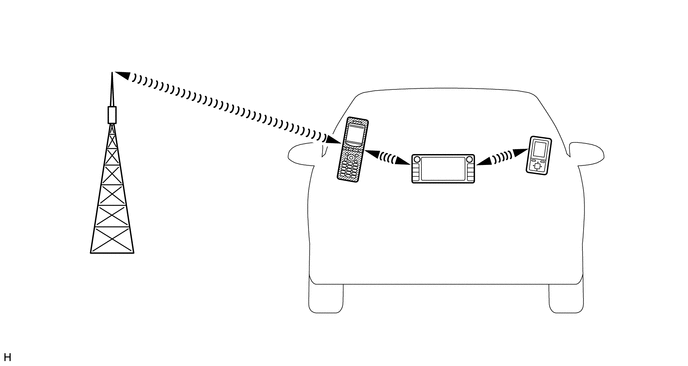
| *1 | Radio and Display Receiver Assembly
(Built-in "Bluetooth" Antenna) |
- | - |
| *a | Example | *b | Cellular Network |
| *c | Cellular Phone
("Bluetooth" Compatible Type) |
*d | Portable Audio Player
("Bluetooth" Compatible Type) |
| *e | "Bluetooth" Wireless Connection | - | - |
"Bluetooth" is a trademark owned by Bluetooth SIG, Inc.
"Bluetooth" is a wireless connection technology that uses the 2.4 GHz frequency band.
- HINT:
-
The communication performance of "Bluetooth" may vary depending on obstructions or radio wave conditions between communication devices, electromagnetic radiation, communication device sensitivity or antenna capacity.
Hands-free function
The "Bluetooth" built-in radio and display receiver assembly and a "Bluetooth" compatible cellular phone* can be connected using a "Bluetooth" wireless connection. This enables the use of the hands-free function on the cellular phone even if the phone is in a pocket or bag. For this reason, it is not necessary to use a connector or cable to connect the cellular phone.
*: Some versions of "Bluetooth" compatible cellular phones may not function properly.
The hands-free function uses a "Bluetooth" wireless connection. A "Bluetooth" wireless connection can be affected by uncertain elements, such as vehicle location, time of day, etc. Therefore, problems related to establishing connection may be caused temporarily by "Bluetooth" connection conditions. It is necessary to check the frequency of occurrence, connection conditions using another cellular phone, etc. when performing diagnosis.
Compatible hands-free devices
| Required "Bluetooth" specifications | Ver. 4.2 or higher |
| Compatible profiles | ·
HFP (Hands-Free Profile) Ver. 1.7 or higher ·
PBAP (Phone Book Access Profile) Ver. 1.2 or higher ·
SPP (Serial Port Profile) Ver. 1.1 or higher |
| Maximum number of hands-free devices that can be registered (including audio devices) | 5 |
- HINT:
-
The amount of remaining battery charge displayed on the radio and display receiver assembly may be different from that of the "Bluetooth" device.
"Bluetooth" audio function
The "Bluetooth" built-in radio and display receiver assembly and a "Bluetooth" compatible portable audio player* can be connected using a "Bluetooth" wireless connection. This enables files stored in the portable audio player to be heard from the vehicle speakers. In addition, operations such as play/stop can be performed directly from the radio and display receiver assembly.
*: Some versions of "Bluetooth" compatible audio players may not be able to be connected via the "Bluetooth" function, or music may play, but functions available using the radio and display receiver assembly may be limited.
Compatible "Bluetooth" audio devices
| Required "Bluetooth" specifications | Ver. 4.2 or higher |
| Compatible profiles | ·
A2DP (Advanced Audio Distribution Profile) Ver. 1.3 or higher ·
AVRCP (Audio/Video Remote Control Profile) Ver. 1.7 or higher (w/o "Apple CarPlay" Function) ·
AVRCP (Audio/Video Remote Control Profile) Ver. 1.6 or higher (w/ "Apple CarPlay" Function) |
| Maximum number of audio devices that can be registered (including hands-free devices) | 5 |
- HINT:
-
The amount of remaining battery charge displayed on the radio and display receiver assembly may be different from that of the "Bluetooth" device.
RADIO DESCRIPTION
Radio frequency band
Radio broadcasts use the radio frequency bands shown in the table below.

Service area
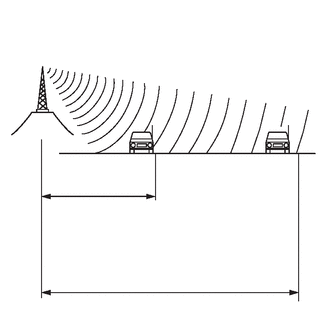
| *a | FM (Stereo) |
| *b | FM (Monaural) |
The service areas of FM broadcasts are vastly different. FM stereo has the smallest service area, and is prone to pick up static and other types of interference such as noise.
Radio reception problems
- HINT:
-
In addition to static, other problems such as "multipath" and "fade out" exist. These problems are not caused by electrical noise, but by the radio signal propagation method itself.
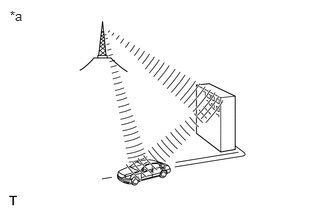
| *a | Multipath |
Multipath
Multipath is a type of interference created when a vehicle receives 2 radio wave signals from the same transmitter. One signal is reflected off buildings or mountains and the other signal is received directly from the transmitter.
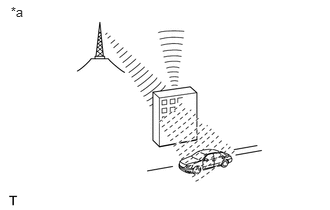
| *a | Fade Out |
Fade out
Fade out is caused by objects (buildings, mountains and other large obstructions) that deflect part of a signal, resulting in a weaker signal when the object is between the transmitter and vehicle. High frequency radio waves, such as FM broadcasts, are easily deflected by obstructions.
Noise problem
Technicians must have a clear understanding about each customer's noise complaint. Use the following table to diagnose noise problems.
| Radio Frequency | Noise Occurrence Condition | Presumable Cause |
|---|---|---|
| FM | Noise occurs while driving in a specific area | Multipath resulting from a change in FM frequency |
AUTOMATIC SOUND LEVELIZER (ASL) FUNCTION OUTLINE
The Automatic Sound Levelizer (ASL) function automatically adjusts the audio system volume in order to compensate for increased vehicle noise (vehicle noise tends to increase as vehicle speed increases). The ASL adjusts the volume based upon vehicle speed signals sent from the combination meter assembly.
"Baidu CarLife" FUNCTION OUTLINE
The "Baidu CarLife" function is a function that enables the head unit to operate applications on a smartphone by connecting the smartphone to the head unit using a dedicated cable.
- HINT:
- ·
Refer to the owner's manual included with the device for information about "Baidu CarLife" support.
·Some applications have a display restriction in consideration of safe driving.
"Apple CarPlay" Function OUTLINE (w/ "Apple CarPlay" Function)
The "Apple CarPlay" Function is a function that enables the head unit to operate applications on a smartphone by connecting the smartphone to the head unit using a dedicated cable.
- HINT:
- ·
Refer to the owner's manual included with the device for information about "Apple CarPlay" support.
·Some applications have a display restriction in consideration of safe driving.
"HUAWEI HiCar" FUNCTION OUTLINE (w/ "HUAWEI HiCar" Function)
The "HUAWEI HiCar" function is a function that enables the head unit to operate applications on a smartphone by connecting the smartphone to the head unit using a dedicated cable.
- HINT:
- ·
Refer to the owner's manual included with the device for information about "HUAWEI HiCar" support.
·Some applications have a display restriction in consideration of safe driving.