AUDIO / VIDEO NOISE FILTER REMOVAL
PROCEDURE

 1.REMOVE REAR SEAT ASSEMBLY (for Fixed Seat Type)
71940A
2.REMOVE REAR SEAT HEADREST ASSEMBLY (for Fold Down Seat Type)
73350C
3.DISCONNECT REAR CENTER SEAT OUTER BELT ASSEMBLY (for Fold Down Seat Type)
4.REMOVE REAR SEATBACK ASSEMBLY LH (for Fold Down Seat Type)
5.REMOVE REAR SEAT CUSHION ASSEMBLY (for Fold Down Seat Type)
6.REMOVE REAR SEAT CUSHION ASSEMBLY (for Fold Down Seat Type)
72693
7.REMOVE REAR SEAT CUSHION LOCK HOOK (for Fold Down Seat Type)
67918A
8.REMOVE REAR DOOR SCUFF PLATE LH (for Gasoline Model)
67918A
9.REMOVE REAR DOOR SCUFF PLATE LH (for HV Model)
76974F
10.REMOVE REAR UNDER SIDE COVER LH (for HV Model)
62332A
11.DISCONNECT REAR DOOR OPENING TRIM WEATHERSTRIP LH
62552F
12.REMOVE REAR SEAT SIDE GARNISH LH
62472A
13.REMOVE ROOF SIDE INNER GARNISH LH
86011A
14.REMOVE RADIO SETTING CONDENSER
- NOTICE:
-
When a terminal cover is removed, the radio setting condenser must be replaced because the terminal covers and condenser are supplied as a set.
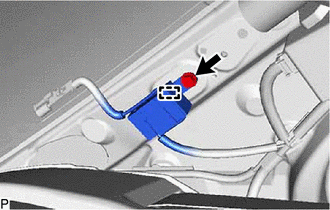
Remove the bolt.
Disengage the clamp and disconnect the radio setting condenser with wire harness from the vehicle body.
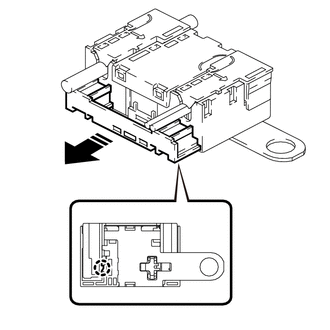

|
Remove in this Direction |
Disengage the claw and pull out the cover as shown in the illustration.
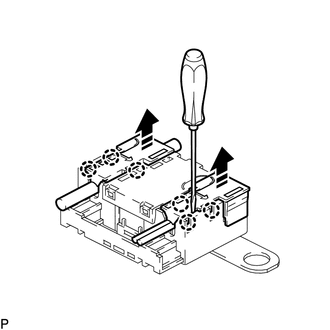
|
|
Remove in this Direction |
Using a screwdriver, disengage the 6 claws and remove the 2 terminal covers with wire harness from the condenser as shown in the illustration.
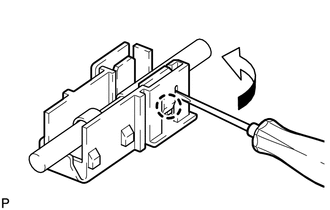
Using a screwdriver, bend back and break off the claw as shown in the illustration.
- HINT:
-
Use the same procedure for the other terminal cover.
Remove the 2 terminal covers from the wire harness.
- NOTICE:
- ·
Make sure to hold the crimped side of the terminal when disconnecting the wire harness from the terminal cover.
·Make sure not to bend the exposed wire when disconnecting the wire harness from the terminal cover.
·Check for deformation of the terminal after the wire harness has been removed from the terminal cover.