MIRROR (EXT) OUTER REAR VIEW MIRROR COVER INSTALLATION
CAUTION / NOTICE / HINT
- HINT:
- ·
Use the same procedure for the RH side and LH side.
·The following procedure is for the LH side.
PROCEDURE

 86790F
1.INSTALL SIDE TELEVISION CAMERA ASSEMBLY (for TFTM Made with Panoramic View Monitor System)
86790F
1.INSTALL SIDE TELEVISION CAMERA ASSEMBLY (for TFTM Made with Panoramic View Monitor System)
2.INSTALL OUTER MIRROR HOLE COVER ASSEMBLY (for GTMC Made)
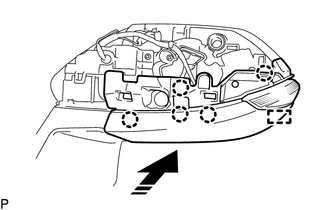

|
Install in this Direction |
Engage the guide and 5 claws as shown in the illustration to install the outer mirror hole cover assembly.
87945
3.INSTALL OUTER MIRROR COVER (for GTMC Made)
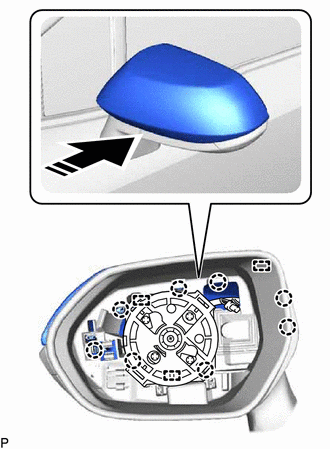
|
|
Install in this Direction |
Engage the 3 guides and 8 claws as shown in the illustration to install the outer mirror cover.
4.INSTALL NO. 2 OUTER MIRROR COVER (for TFTM Made without Panoramic View Monitor System)
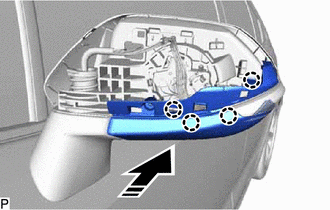
|
|
Install in this Direction |
Engage the 4 claws as shown in the illustration.
Install the No. 2 outer mirror cover with the screw.
5.INSTALL OUTER MIRROR HOLE COVER WITH TELEVISION CAMERA (for TFTM Made with Panoramic View Monitor System)
Connect the connector.
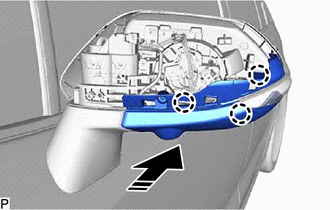
|
|
Install in this Direction |
Engage the 3 claws as shown in the illustration.
Install the outer mirror hole cover with television camera with the 2 screws.
87945
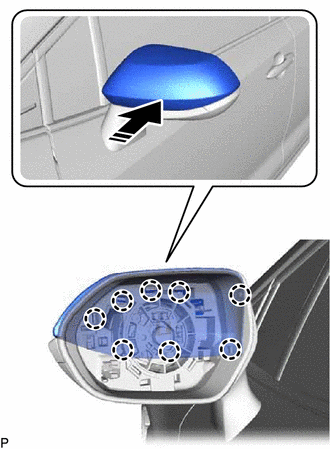
6.INSTALL OUTER MIRROR COVER (for TFTM Made)
|
|
Install in this Direction |
Engage the 8 claws as shown in the illustration to install the outer mirror cover.
87961
7.INSTALL OUTER MIRROR
8.PERFORM CALIBRATION (for TFTM Made with Panoramic View Monitor System)