TELEMATICS TELEMATICS SYSTEM(for ERA-GLONASS) OPERATION CHECK
ENTER TEST MODE
- HINT:
- ·
By performing a test call, it is possible to check the operation of the telematics transceiver.
·Make sure to perform a test call after troubleshooting the telematics system.
·Depending on radio wave signal conditions and the test center condition, a test call may fail even though the vehicle is not malfunctioning.
Turn the ignition switch to ON and wait for 60 seconds with the vehicle stopped.
Turn the taillights on and off at an interval of 10 seconds or less as follows:
- HINT:
- ·
These operations should be performed 10 times or more, until both the red and green indicator lights of the manual (SOS) switch are flashing.
·Turning the taillights on and off can be confirmed by the dimming of the green indicator of the manual (SOS) switch.
for Light Control Switch with Off Position:
Cover the automatic light control sensor with an opaque cover so that light does not reach it, and turn the light control switch from "Off" to "AUTO" and back again repeatedly.
(Example: Off → AUTO → Off → AUTO . . . .)
for Light Control Switch without Off Position:
With the automatic light control sensor exposed to light, turn the light control switch from "AUTO" to "Tail" and back again repeatedly.
(Example: AUTO → Tail → AUTO → Tail . . . .)
for Light Control Switch without Off Position (if the above procedure cannot be completed successfully):
With the automatic light control sensor exposed to light, use an opaque cover to repeatedly cover and uncover the automatic light control sensor.
(Example: Uncover → Cover → Uncover → Cover . . . .)
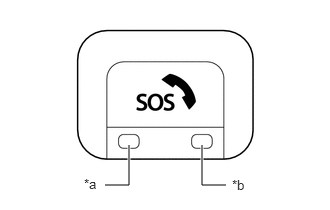
| *a | Manual (SOS) Switch Green Indicator |
| *b | Manual (SOS) Switch Red Indicator |
Check that the manual (SOS) switch indicators begin blinks 5 times over 10 seconds and then turn off. Push the manual (SOS) switch for less than 3 seconds within 15 seconds after the indicators begin to blink to enter test mode.
PERFORM TEST CALL
Enter test mode.
- HINT:
-
The manual (SOS) switch indicator (green) will blink 3 times to indicate that test mode has been entered.
Speak into the communication telematics box and confirm that your voice can be heard from the communication telematics box, and then press the manual (SOS) switch for 3 seconds or less to enter test call mode.
- HINT:
- ·
If your voice cannot be heard from the speakers, press and hold the manual (SOS) switch for 3 to 10 seconds.
·The manual (SOS) switch indicator (green) will blink 4 times.
Press the manual (SOS) switch and check that the manual (SOS) switch indicator (green) blinks 1 time. A test call will be performed and test data will be transmitted.
- HINT:
- ·
The manual (SOS) switch indicator (green) will illuminate for 10 seconds if test data transmission was successful.
·The manual (SOS) switch indicator (red) will illuminate for 10 seconds if test data transmission fails.