CRUISE CONTROL DYNAMIC RADAR CRUISE CONTROL SYSTEM ROAD TEST
- HINT:
- ·
The dynamic radar cruise control system has 2 cruise control modes: constant speed control mode and vehicle-to-vehicle distance control mode.
·Vehicle-to-vehicle distance control mode is selected by default when the dynamic radar cruise control system is turned on using the cruise control main switch.
PROBLEM SYMPTOM CONFIRMATION (CONSTANT SPEED CONTROL MODE)
Inspect the SET function.
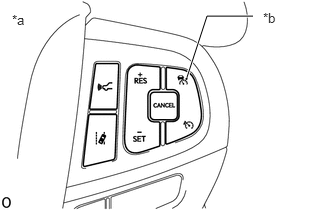
| *a | Steering Pad Switch Assembly |
| *b | Cruise Control Main Switch |
Push and hold the cruise control main switch for 1.5 seconds or more with the dynamic radar cruise control system off to change to constant speed control mode.
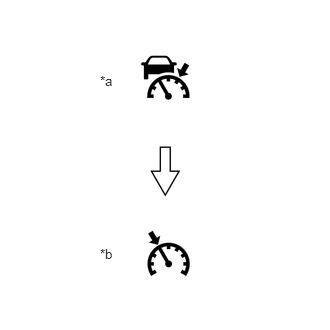
| *a | Cruise Control Indicator
(Vehicle-to-vehicle Distance Control Mode) |
| *b | Cruise Control Indicator
(Constant Speed Control Mode) |
Check that the cruise control indicator (vehicle-to-vehicle distance control mode) turns off and the cruise control indicator (constant speed control mode) illuminates.
Drive at approximately 30 km/h (20 mph) or higher.
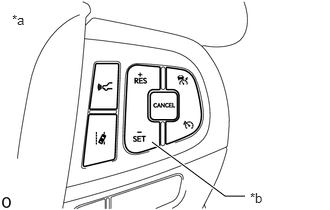
| *a | Steering Pad Switch Assembly |
| *b | -SET Switch |
Push the -SET switch.
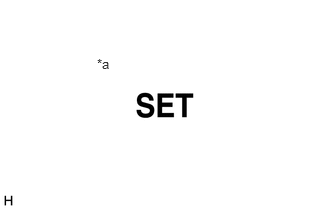
| *a | Cruise SET Indicator |
Check that the cruise SET indicator illuminates at this time.
After releasing the switch, check that the vehicle maintains the set vehicle speed.
- HINT:
-
If the vehicle speed decreases to 16 km/h (10 mph) less than the set vehicle speed such as when driving on a steep slope, control of vehicle speed by the constant speed control mode is canceled.
Inspect the + (ACCEL) function.
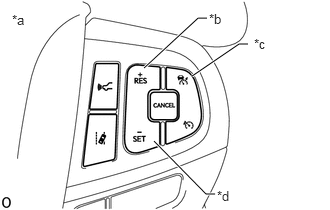
| *a | Steering Pad Switch Assembly |
| *b | +RES Switch |
| *c | Cruise Control Main Switch |
| *d | -SET Switch |
Push and hold the cruise control main switch for 1.5 seconds or more with the dynamic radar cruise control system off to change to constant speed control mode.
Drive at approximately 30 km/h (20 mph) or higher.
Push the -SET switch.
Check that vehicle speed increases while the +RES switch is pushed, and that the vehicle maintains the newly set vehicle speed when the switch is released.
Push the +RES switch and then release it immediately. Check that vehicle speed increases by approximately 1 km/h (1 mph) (tap-up control).
- HINT:
-
If the difference between the set vehicle speed and actual vehicle speed is 5 km/h (3 mph) or more, tap-up control will not operate.
Confirm that the set vehicle speed displayed on the multi-information display changes when the +RES switch is pushed.
Inspect the - (COAST) function.
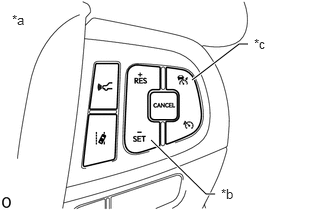
| *a | Steering Pad Switch Assembly |
| *b | -SET Switch |
| *c | Cruise Control Main Switch |
Push and hold the cruise control main switch for 1.5 seconds or more with the dynamic radar cruise control system off to change to constant speed control mode.
Drive at approximately 30 km/h (20 mph) or higher.
Push the -SET switch.
Check that vehicle speed decreases while the -SET switch is pushed, and the vehicle maintains the newly set vehicle speed when the switch is released.
- HINT:
-
If the vehicle speed decreases to approximately 30 km/h (20 mph), control of vehicle speed by the constant speed control mode is canceled.
Push the -SET switch, and then release it immediately. Check that vehicle speed decreases by approximately 1 km/h or 1 mph (tap-down control).
- HINT:
-
If the difference between the set vehicle speed and actual vehicle speed is 5 km/h (3 mph) or more and the -SET switch is pushed, the vehicle speed is stored as the set vehicle speed and the vehicle will be driven in constant speed control mode.
Confirm that the set vehicle speed displayed on the multi-information display changes when the -SET switch is pushed.
Inspect the CANCEL function.
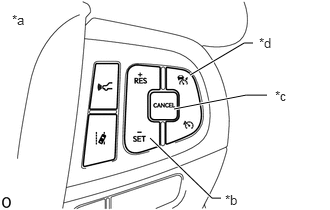
| *a | Steering Pad Switch Assembly |
| *b | -SET Switch |
| *c | CANCEL Switch |
| *d | Cruise Control Main Switch |
Push and hold the cruise control main switch for 1.5 seconds or more with the dynamic radar cruise control system off to change to constant speed control mode.
Drive at approximately 30 km/h (20 mph) or higher.
Push the -SET switch.
When any of the following are performed, check that control of vehicle speed by the constant speed control mode is canceled and that normal driving resumes (no control of vehicle speed by the constant speed control mode).
Depressing the brake pedal.
Pushing the CANCEL switch.
Turning the constant speed control mode off using the cruise control main switch (the stored vehicle speed in the ECM is not maintained).
Moving the shift lever from D to any other position.
Selecting the S3, S2 or S1 range with the shift lever in S.
Inspect the RES (RESUME) function.
- HINT:
-
If the vehicle speed decreases to less than approximately 30 km/h (20 mph), pushing the +RES switch reinstates the set vehicle speed that was set before control of vehicle speed by the constant speed control mode was canceled.
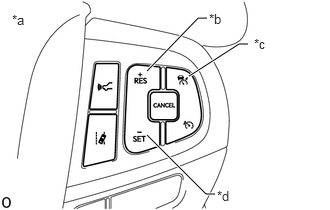
| *a | Steering Pad Switch Assembly |
| *b | +RES Switch |
| *c | Cruise Control Main Switch |
| *d | -SET Switch |
Push and hold the cruise control main switch for 1.5 seconds or more with the dynamic radar cruise control system off to change to constant speed control mode.
Drive at approximately 30 km/h (20 mph) or higher.
Push the -SET switch.
Depress the brake pedal to cancel control of vehicle speed by the constant speed control mode.
Push the +RES switch while driving the vehicle at a speed of more than approximately 30 km/h (20 mph), and check that the vehicle resumes the speed set prior to cancellation and that the cruise SET indicator illuminates.
PROBLEM SYMPTOM CONFIRMATION (VEHICLE-TO-VEHICLE DISTANCE CONTROL MODE)
Inspect the SET function.
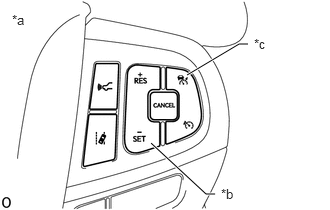
| *a | Steering Pad Switch Assembly |
| *b | Cruise Control Main Switch |
| *c | -SET Switch |
Turn the vehicle-to-vehicle distance control mode on using the cruise control main switch.
Check that the cruise control indicator illuminates in the combination meter assembly.
Drive at approximately 30 km/h (20 mph) or higher.
Push the -SET switch.
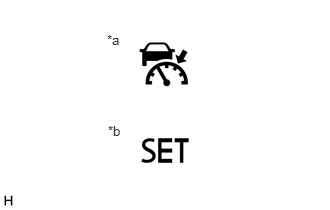
| *a | Cruise Control Indicator
(Vehicle-to-vehicle Distance Control Mode) |
| *b | Cruise SET Indicator |
Check that the cruise control indicator (vehicle-to-vehicle distance control mode) remains illuminated, the cruise SET indicator illuminates in the combination meter assembly and the set vehicle speed is displayed on the multi-information display.
After releasing the switch, check that the vehicle maintains the set vehicle speed.
Inspect the + (ACCEL) function.
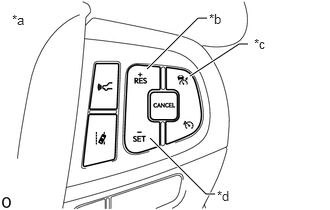
| *a | Steering Pad Switch Assembly |
| *b | +RES Switch |
| *c | Cruise Control Main Switch |
| *d | -SET Switch |
Turn the vehicle-to-vehicle distance control mode on using the cruise control main switch.
Drive at approximately 30 km/h (20 mph) or higher.
Push the -SET switch.
Push and hold the +RES switch and check that vehicle speed increases in approximately 5 km/h (5 mph) increments.
Tap-up control
- HINT:
-
Control is performed by pattern A or pattern B shown below according to the destination of the vehicle.
Pattern A:
Push the +RES switch and then release it immediately. Check that vehicle speed increases by approximately 1 km/h (1 mph).
Pattern B:
Push the +RES switch and then release it immediately. Check that vehicle speed increases by approximately 5 km/h (5 mph).
Confirm that the set vehicle speed displayed on the multi-information display changes when the +RES switch is pushed.
Inspect the - (COAST) function.
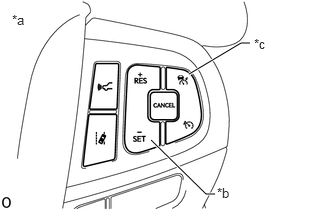
| *a | Steering Pad Switch Assembly |
| *b | -SET Switch |
| *c | Cruise Control Main Switch |
Turn the vehicle-to-vehicle distance control mode on using the cruise control main switch.
Drive at approximately 30 km/h (20 mph) or higher.
Push the -SET switch.
Push and hold the -SET switch and check that vehicle speed decreases in approximately 5 km/h (5 mph) increments.
Tap-down control
- HINT:
-
Control is performed by pattern A or pattern B shown below according to the destination of the vehicle.
Pattern A:
Push the -SET switch, and then release it immediately. Check that vehicle speed decreases by approximately 1 km/h (1 mph).
Pattern B:
Push the -SET switch, and then release it immediately. Check that vehicle speed decreases by approximately 5 km/h (5 mph).
Confirm that the set vehicle speed displayed on the multi-information display changes when the -SET switch is pushed.
Inspect the CANCEL function.
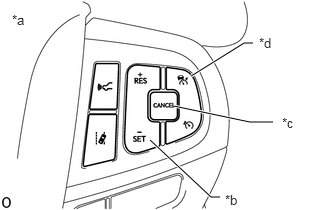
| *a | Steering Pad Switch Assembly |
| *b | -SET Switch |
| *c | CANCEL Switch |
| *d | Cruise Control Main Switch |
Turn the vehicle-to-vehicle distance control mode on using the cruise control main switch.
Drive at approximately 30 km/h (20 mph) or higher.
Push the -SET switch.
When any of the following are performed, check that control of vehicle speed by the dynamic radar cruise control system is canceled and that normal driving resumes (no control of vehicle speed by the vehicle-to-vehicle distance control mode).
Depressing the brake pedal.
- HINT:
-
When the vehicle is stopped, control of vehicle speed by the vehicle-to-vehicle distance control mode will not be canceled when the brake pedal is depressed.
Pushing the CANCEL switch.
Turning the vehicle-to-vehicle distance control mode off using the cruise control main switch (the stored vehicle speed in the ECM is not maintained).
Moving the shift lever from D to any other position.
Selecting the S3, S2 or S1 range with the shift lever in S.
Inspect the RES (RESUME) function.
- HINT:
-
If the vehicle speed decreases to less than approximately 30 km/h (20 mph), pushing the +RES switch reinstates the set vehicle speed that was set before control of vehicle speed by the vehicle-to-vehicle distance control mode was canceled.
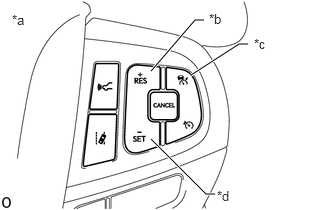
| *a | Steering Pad Switch Assembly |
| *b | +RES Switch |
| *c | Cruise Control Main Switch |
| *d | -SET Switch |
Turn the vehicle-to-vehicle distance control mode on using the cruise control main switch.
Drive at approximately 30 km/h (20 mph) or higher.
Push the -SET switch.
Depress the brake pedal to cancel control of vehicle speed by the vehicle-to-vehicle distance control mode.
Push the +RES switch while driving the vehicle at a speed of more than approximately 25 km/h (16 mph), and check that the vehicle resumes the speed set prior to cancellation and that the cruise SET indicator illuminates.
CHECK DYNAMIC RADAR CRUISE CONTROL WITH ROAD SIGN ASSIST FUNCTION (w/ Dynamic Radar Cruise Control with Road Sign Assist Function)
- HINT:
- ·
This function can be enabled/disabled via the customization setting in the multi-information display.
·This function can only be used when the dynamic radar cruise control system is set to vehicle-to-vehicle distance control mode.
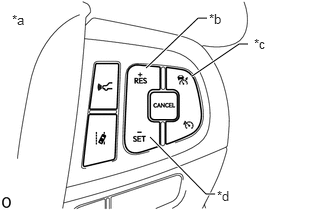
| *a | Steering Pad Switch Assembly |
| *b | +RES Switch |
| *c | Cruise Control Main Switch |
| *d | -SET Switch |
Turn the dynamic radar cruise control system on using the cruise control main switch.
Drive at approximately 30 km/h (20 mph) or higher.
Push the -SET switch.
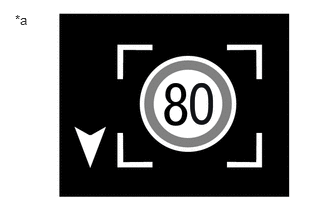
When driving with vehicle-to-vehicle distance control mode selected, the speed sign is displayed on the multi-information display in the combination meter assembly when the road sign assist system recognizes a speed limit sign. At this time, perform the operations shown below to confirm that the dynamic radar cruise control with road sign assist function operates correctly.
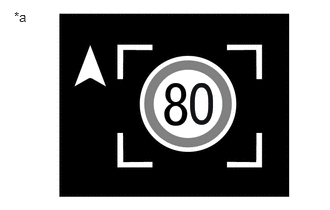
| *a | Example |
When the speed limit is higher than the set vehicle speed:
Press and hold the +RES switch to increase the set vehicle speed to the speed limit.
| *a | Example |
When the speed limit is lower than the set vehicle speed:
Press and hold the -SET switch to decrease the set vehicle speed to the speed limit.