CRUISE CONTROL DYNAMIC RADAR CRUISE CONTROL SYSTEM OPERATION CHECK
INPUT SIGNAL CHECK
Connect the GTS to the DLC3.
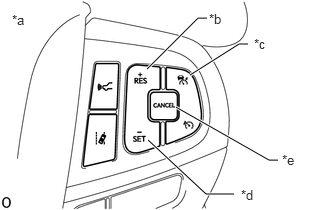
| *a | Steering Pad Switch Assembly |
| *b | +RES Switch |
| *c | Cruise Control Main Switch |
| *d | -SET Switch |
| *e | CANCEL Switch |
Check the steering pad switch assembly using the Data List function of the GTS (cruise control main switch, -SET switch, +RES switch and CANCEL switch).
INSPECT CRUISE CONTROL MAIN SWITCH
Turn the engine switch on (IG).
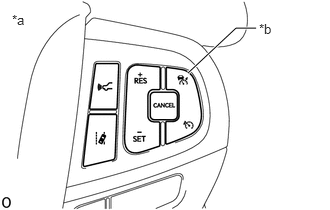
| *a | Steering Pad Switch Assembly |
| *b | Cruise Control Main Switch |
Turn the dynamic radar cruise control system on using the cruise control main switch.
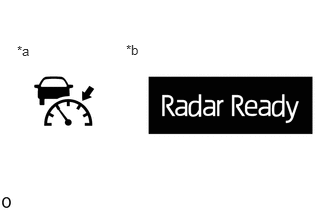
| *a | Cruise Control Indicator
(Vehicle-to-vehicle Distance Control Mode) |
| *b | Multi-information Display |
Check that the cruise control indicator (vehicle-to-vehicle distance control mode) in the combination meter assembly illuminates and "Radar Ready" is displayed on the multi-information display.
Turn the dynamic radar cruise control system off using the cruise control main switch. Check that the cruise control indicator (vehicle-to-vehicle distance control mode) in the combination meter assembly and "Radar Ready" on the multi-information display turn off.
Turn the engine switch off with the cruise control indicator (vehicle-to-vehicle distance control mode) in the combination meter assembly illuminated and "Radar Ready" on the multi-information display displayed. Turn the engine switch back to on (IG) and check that the cruise control indicator (vehicle-to-vehicle distance control mode) in the combination meter assembly and "Radar Ready" on the multi-information display are turned off.
INSPECT MODE SELECT
Turn the engine switch on (IG).
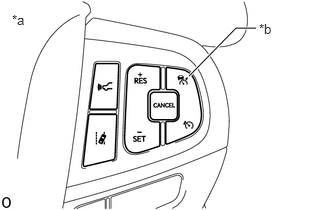
| *a | Steering Pad Switch Assembly |
| *b | Cruise Control Main Switch |
Push and hold the cruise control main switch for 1.5 seconds or more with the dynamic radar cruise control system off to change to constant speed control mode.
- NOTICE:
-
Do not push any other switches before pushing the cruise control main switch. If any other switches are pushed, turn the dynamic radar cruise control system off and repeat the above procedure.
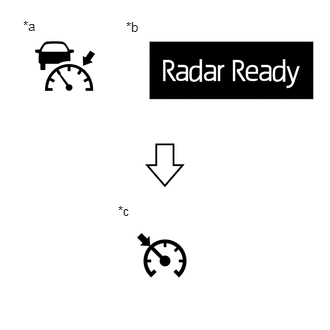
| *a | Cruise Control Indicator
(Vehicle-to-vehicle Distance Control Mode) |
| *b | Multi-information Display |
| *c | Cruise Control Indicator
(Constant Speed Control Mode) |
Check that the cruise control indicator (vehicle-to-vehicle distance control mode) in the combination meter assembly and "Radar Ready" on the multi-information display turn off and the cruise control indicator (constant speed control mode) illuminates.
INSPECT VEHICLE-TO-VEHICLE DISTANCE CONTROL SWITCH
Turn the engine switch on (IG).
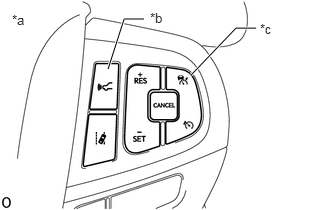
| *a | Steering Pad Switch Assembly |
| *b | Vehicle-to-vehicle Distance Control Switch |
| *c | Cruise Control Main Switch |
Turn the dynamic radar cruise control system on using the cruise control main switch.
- HINT:
-
When in constant speed control mode, the vehicle-to-vehicle distance cannot be changed.
Press the vehicle-to-vehicle distance control switch.
Check that the indicator of the vehicle-to-vehicle distance, which is shown on the multi-information display in the combination meter assembly changes from long to middle to short in that order.
- HINT:
-
Long is automatically selected each time the engine switch is turned on (IG).