EXTERIOR PANELS / TRIM RADIATOR GRILLE(for Wagon) DISASSEMBLY
PROCEDURE

 86799
1.REMOVE TELEVISION CAMERA WIRE (w/ Panoramic View Monitor System)
86799
1.REMOVE TELEVISION CAMERA WIRE (w/ Panoramic View Monitor System)
86790B
2.REMOVE FRONT TELEVISION CAMERA ASSEMBLY (w/ Panoramic View Monitor System)
88211B
3.REMOVE MILLIMETER WAVE RADAR SENSOR ASSEMBLY (w/ Pre-collision System)
4.REMOVE NUT WITH WASHER (w/ Pre-collision System)
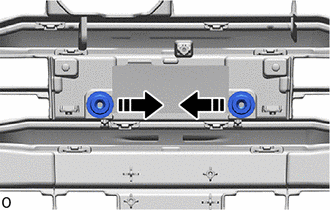

|
Remove in this Direction |
Remove the 2 nut with washers as shown in the illustration.
53141C
5.REMOVE RADIATOR GRILLE GARNISH (w/ Pre-collision System)
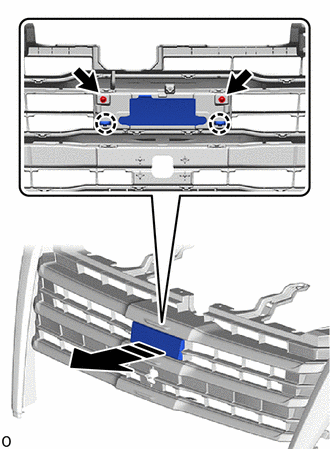
|
|
Remove in this Direction |
Remove the 2 screws.
Detach the claw and remove the radiator grille garnish as shown in the illustration.
53141C
6.REMOVE NO. 2 RADIATOR GRILLE GARNISH (w/o Pre-collision System)
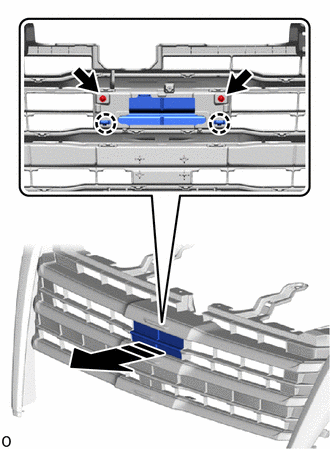
|
|
Remove in this Direction |
Remove the 2 screws.
Detach the claw and remove the No. 2 radiator grille garnish as shown in the illustration.
53126A
7.REMOVE CENTER RADIATOR GRILLE MOULDING LH
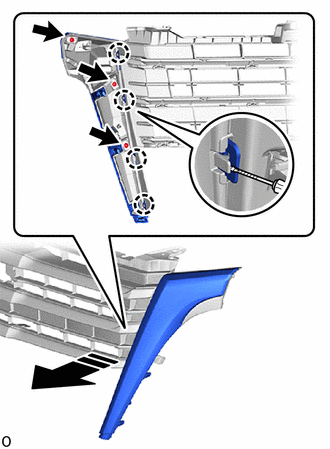
|
|
Remove in this Direction |

|
Protective Tape |
Remove the 3 screws.
Using a screwdriver, detach the claw and remove the center radiator grille moulding LH as shown in the illustration.
- HINT:
-
Tape the screwdriver tip before use.
53125A
8.REMOVE CENTER RADIATOR GRILLE MOULDING RH
- HINT:
-
Use the same procedure described for the LH side.
53121J
9.REMOVE NO. 1 RADIATOR GRILLE MOULDING
Using a screwdriver, detach the claw and remove the No. 1 radiator grille moulding as shown in the illustration.
- HINT:
-
Tape the screwdriver tip before use.
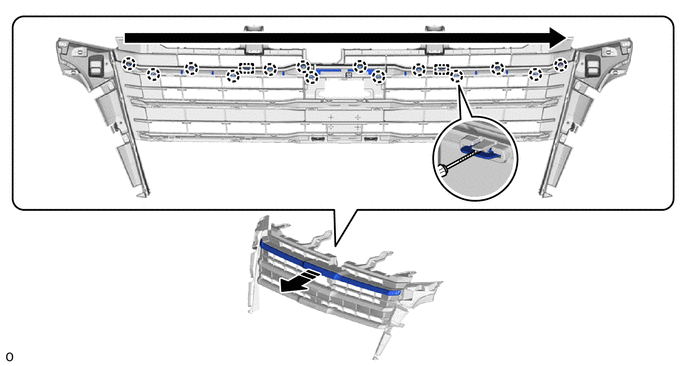
|
|
Remove in this Direction | 
|
Order of Removal |
|
|
Protective Tape | - | - |
53122F
10.REMOVE NO. 2 RADIATOR GRILLE MOULDING
Using a screwdriver, detach the claw and remove the No. 2 radiator grille moulding as shown in the illustration.
- HINT:
-
Tape the screwdriver tip before use.
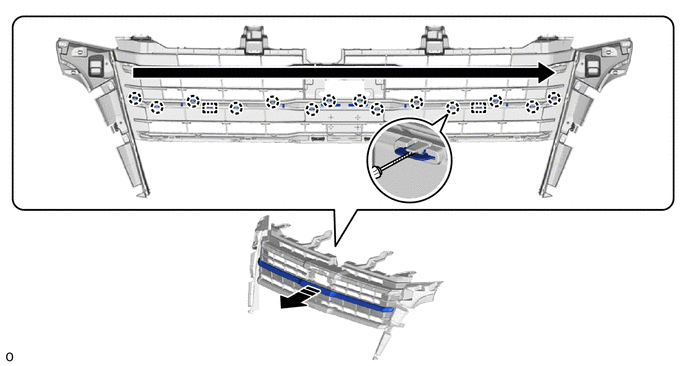
|
|
Remove in this Direction |
|
Order of Removal |
|
|
Protective Tape | - | - |
53123L
11.REMOVE NO. 3 RADIATOR GRILLE MOULDING
Using a screwdriver, detach the claw and remove the No. 3 radiator grille moulding as shown in the illustration.
- HINT:
-
Tape the screwdriver tip before use.
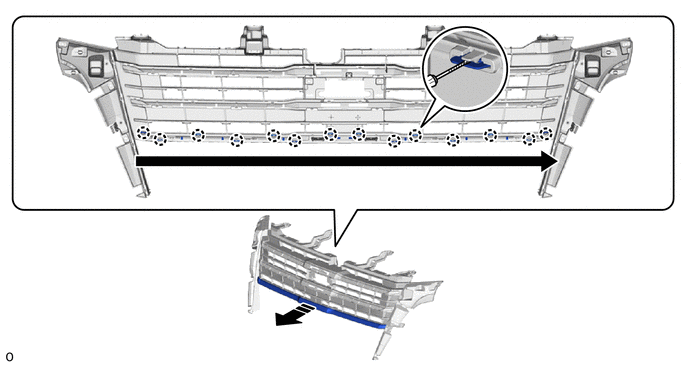
|
|
Remove in this Direction |
|
Order of Removal |
|
|
Protective Tape | - | - |