PARKING BRAKE PARKING BRAKE SYSTEM(w/o Electric Parking Brake) ADJUSTMENT
PROCEDURE

 1.INSPECT PARKING BRAKE LEVER TRAVEL
Fully pull the parking brake lever to engage the parking brake.
Release the lever to disengage the parking brake.
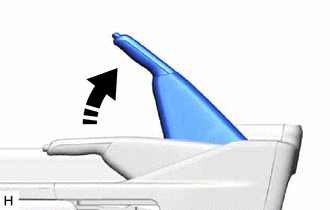
Slowly pull the parking brake lever all the way, and count the number of clicks.
- Standard Parking Brake Lever Travel when Pulled with a Force of 200 N (20 kgf, 45 lbf):
8 to 11 clicks
If the parking brake lever travel is not as specified, adjust the parking brake shoe clearance and parking brake lever travel.
2.REMOVE REAR WHEEL
58903A
3.REMOVE CONSOLE REAR END PANEL SUB-ASSEMBLY (for Separate Seat Type)
58904B
4.REMOVE PARKING BRAKE HOLE COVER SUB-ASSEMBLY (for Separate Seat Type)
58904B
5.REMOVE PARKING BRAKE HOLE COVER SUB-ASSEMBLY (except Separate Seat Type)
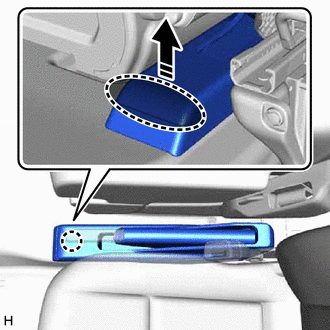

|
Place Finger Here |

|
Remove in this Direction |
Place your finger at the position shown in the illustration and pull in the direction of the arrow to detach the claw.
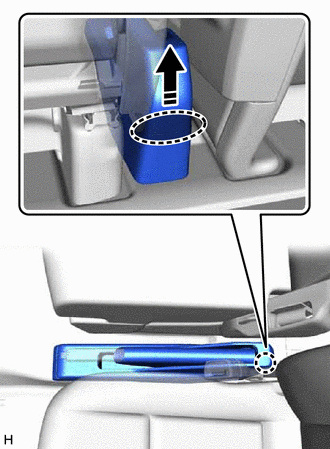
|
|
Place Finger Here |
|
|
Remove in this Direction |
Place your hand at the position shown in the illustration and pull in the direction of the arrow to detach the claw and remove the parking brake hole cover sub-assembly.
58997
6.REMOVE NO. 3 CONSOLE BOX MOUNTING BRACKET (except Separate Seat Type)
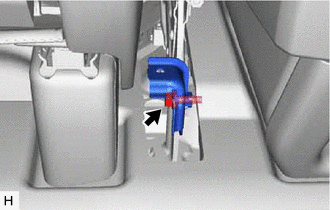
Remove the bolt and No. 3 consol box mounting bracket.
7.ADJUST PARKING BRAKE LEVER TRAVEL (for Rear Drum Brake)
Completely release the parking brake lever.
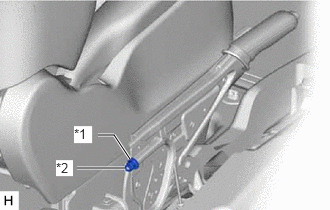
| *1 | No. 1 Wire Adjusting Nut |
| *2 | Lock Nut |
Loosen the lock nut and No. 1 wire adjusting nut to completely release the parking brake cable.
Temporarily install the hub nuts to the hub bolts.
- HINT:
-
Securely install the hub nuts to the rear brake drum sub-assembly.
Adjust rear drum brake shoe clearance.
Check that there is no brake drag against the shoe.
Operate the parking brake lever 3 to 4 times.
Turn the No. 1 wire adjusting nut until the parking brake lever travel is corrected to be within the specified range.
- Standard Parking Brake Lever Travel when Pulled with a Force of 200 N (20 kgf, 45 lbf):
8 to 11 clicks
Using a wrench or an equivalent tool, hold the No. 1 wire adjusting nut and tighten the lock nut.
- Torque:
- 6.0 N*m (61 kgf*cm, 53 in.*lbf)
Operate the parking brake lever 3 to 4 times, and check the parking brake lever travel.
- Standard Parking Brake Lever Travel when Pulled with a Force of 200 N (20 kgf, 45 lbf):
8 to 11 clicks
Check that there is no brake drag against the shoe.
Remove the hub nuts from the hub bolts.
8.ADJUST PARKING BRAKE LEVER TRAVEL (for Rear Disc Brake)
Completely release the parking brake lever.
| *1 | No. 1 Wire Adjusting Nut |
| *2 | Lock Nut |
Loosen the lock nut and No. 1 wire adjusting nut to completely release the parking brake cable.
Temporarily install the hub nuts to the hub bolts.
- HINT:
-
Securely install the hub nuts to the rear disc.
Remove the parking brake shoes adjusting hole plug.
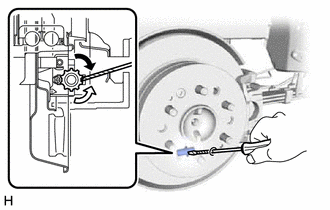

|
Contract |

|
Expand |
Turn the parking brake shoe adjuster and expand the shoes until the disc locks.
Turn and contract the parking brake shoe adjuster until the rear disc can rotate smoothly.
- Standard:
Returns 8 notches.
Check that there is no brake drag against the shoe.
Operate the parking brake lever 3 to 4 times.
Turn the No. 1 wire adjusting nut until the parking brake lever travel is corrected to be within the specified range.
- Standard Parking Brake Lever Travel when Pulled with a Force of 200 N (20 kgf, 45 lbf):
8 to 11 clicks
Using a wrench or an equivalent tool, hold the No. 1 wire adjusting nut and tighten the lock nut.
- Torque:
- 6.0 N*m (61 kgf*cm, 53 in.*lbf)
Operate the parking brake lever 3 to 4 times, and check the parking brake lever travel.
- Standard Parking Brake Lever Travel when Pulled with a Force of 200 N (20 kgf, 45 lbf):
8 to 11 clicks
Install the parking brake shoe adjusting hole plug.
Check that the parking brake does not drag.
Remove the hub nuts from the hub bolts.
58904B
9.INSTALL PARKING BRAKE HOLE COVER SUB-ASSEMBLY (for Separate Seat Type)
58903A
10.INSTALL CONSOLE REAR END PANEL SUB-ASSEMBLY (for Separate Seat Type)
58997
11.INSTALL NO. 3 CONSOLE BOX MOUNTING BRACKET (except Separate Seat Type)
Install the No. 3 consol box mounting bracket with the bolt.
58904B
12.INSTALL PARKING BRAKE HOLE COVER SUB-ASSEMBLY (except Separate Seat Type)
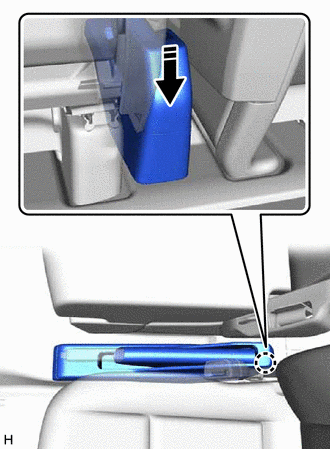
|
|
Install in this Direction |
Attach the claw to connect the parking brake hole cover sub-assembly as shown in the illustration.

|
|
Install in this Direction |
Attach the claw to install the parking brake hole cover sub-assembly as shown in the illustration.
13.INSTALL REAR WHEEL
14.INSPECT BRAKE WARNING LIGHT
When operating the parking brake lever, check that the brake warning light illuminates.
- Standard:
The brake warning light always illuminates at the first click.