PARK ASSIST / MONITORING REAR VIEW MONITOR SYSTEM(for Inner Rear View Mirror Type) SYSTEM DESCRIPTION
OPERATION EXPLANATION
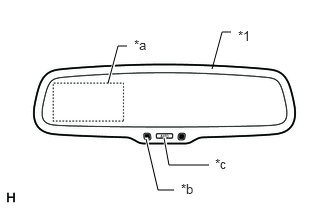
| *1 | Inner Rear View Mirror Assembly |
| *a | Display |
| *b | LED Indicator |
| *c | AUTO Button |
The inner rear view mirror assembly receives the reverse shift position signal when the shift lever is moved to R. After receiving the reverse shift position signal, the inner rear view mirror assembly displays the rear view monitor image from the television camera assembly. (LED: Green)
- HINT:
- ·
When the shift lever is moved to any position except R, the display is turned off. Also, the display is automatically turned off after 5 minutes of continuous operation.
·When the image from the television camera assembly is displayed, press the "AUTO" button on the inner rear view mirror assembly to switch the screen ON/OFF mode.
-Screen ON mode: Screen is displayed and green indicator comes on. (LED: Amber → Green)
-Screen OFF mode: Screen is not displayed and amber indicator comes on. (LED: Green → Amber)
·The inner rear view mirror assembly will set to Screen ON mode each time the ignition switch is turned from off to ON.
·If the amber LED light is illuminated on the inner rear view mirror assembly with the ignition switch ON and the shift lever is in R, this indicates that the monitor image has been canceled manually. Check if the image is displayed by pressing the AUTO button.
The operation conditions of the rear view monitor system are as follows:
The ignition switch is ON
The shift lever is in R
The LED on the inner rear view mirror assembly is green (the LED color changes by pressing the AUTO button).