DOOR LOCK WIRELESS DOOR LOCK CONTROL SYSTEM(w/o Entry and Start System) DIAGNOSIS SYSTEM
SELF-DIAGNOSTIC MODE
Connect the GTS to the DLC3.
Turn the ignition switch to ON.
Turn the GTS on.
Enter the following menus: Body Electrical / Main Body / Utility / Wireless Door Lock Diagnosis Mode.
- Body Electrical > Main Body > Utility
-
Tester Display Wireless Door Lock Diagnosis Mode - 50005 123 3164
Proceed to the next step in accordance with the prompts on the GTS screen.
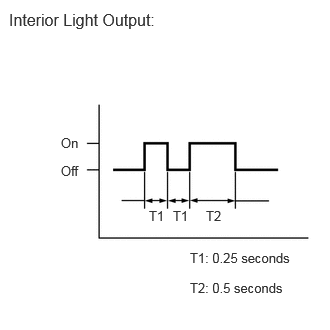
Check that the system has switched to self-diagnostic mode by checking the interior light output pattern.
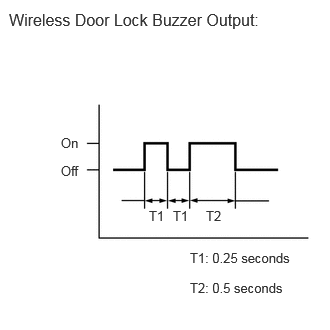
Check that the system has switched to self-diagnostic mode by checking the wireless door lock buzzer output pattern. (w/ Wireless Door Lock Buzzer Answer-back Function)
Check the diagnostic outputs when a door control transmitter module set sub-assembly switch is pressed. The diagnostic outputs can be checked by the interior light patterns.

| Interior Light Output | Suspected Area |
|---|---|
| A | Normal (No malfunction) |
| B | Register wireless code |
| C | Wave interference or malfunction of a related component |
Check the diagnostic outputs when a door control transmitter module set sub-assembly switch is pressed. The diagnostic outputs can be checked by the wireless door lock buzzer patterns. (w/ Wireless Door Lock Buzzer Answer-back Function)

| Wireless Door Lock Buzzer Output | Suspected Area |
|---|---|
| A | Normal (No malfunction) |
| B | Register wireless code |
| C | Wave interference or malfunction of a related component |