MIRROR (INT) DIGITAL INNER MIRROR ON-VEHICLE INSPECTION
PROCEDURE

 87810
1.INSPECT INNER REAR VIEW MIRROR ASSEMBLY
87810
1.INSPECT INNER REAR VIEW MIRROR ASSEMBLY
- NOTICE:
- ·
Perform this check indoors.
·DAY condition is the condition where the mirror surface becomes bright, and the NIGHT condition is the condition where the mirror surface becomes dark.
Turn the ignition switch on (IG).
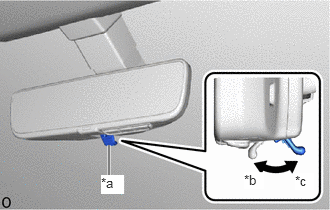
| *a | Mode Selection Lever |
| *b | Digital Mirror Mode |
| *c | Surface Mirror Mode |
For digital mirror mode, operate the mode selection lever to switch it to surface mirror mode.
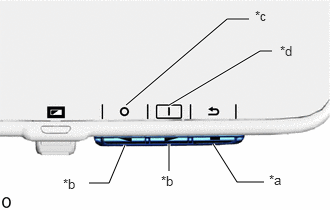
| *a | MENU/OK Switch |
| *b | Cursor Operation Switch |
| *c | Automatic Glare-resistant Mode OFF |
| *d | Automatic Glare-resistant Mode ON |
In the following conditions, check that the automatic glare-resistant mode turns ON (operating condition), then press the MENU/OK switch and check that the cursor is at the position shown in the illustration and DAY condition is activated.
- HINT:
- ·
After turning the ignition switch on (IG), automatic glare-resistant mode turns ON (operating condition) and operation starts from DAY condition.
·The system may switch from DAY to NIGHT condition depending on the condition of the surrounding area.
If the cursor is not at the position shown in the illustration, operate the cursor operation switch and switch the automatic glare-resistant mode from OFF (non-operating condition) to ON (operating condition) and press the MENU/OK switch.
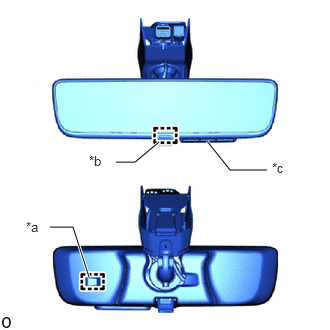
| *a | Forward Sensor |
| *b | Rear Light Sensor |
| *c | Cursor Operation Switch |
Press the MENU/OK switch on the selection switch and operate the cursor operation switch to check if the mirror surface reflection condition switches the automatic glare-resistant mode from ON (operating condition) to OFF (non-operating condition) and switches to DAY condition.
Operate the cursor operation switch to change the automatic glare-resistant mode to ON (operating condition).
Check if the mirror surface reflection condition switches from DAY to NIGHT when a fluorescent light is used to illuminate the rear light sensor while the ambient light sensor (backside) is covered with a hand.
Check that the mirror surface reflection condition switches from NIGHT to DAY when the hand is removed and the light is switched off.
- NOTICE:
-
The mirror surface reflection may not switch depending on the orientation of the mirror surface or the surrounding condition, so change the surrounding condition and orientation of the mirror surface, and perform the check a few times.