THEFT DETERRENT / KEYLESS ENTRY DIGITAL KEY SYSTEM Digital Key Battery Charge Low is not Displayed on the Multi-information Display
DESCRIPTION
To display a low battery voltage notification on the multi-information display in the combination meter assembly, it is necessary to set the display setting to ON in the digital key application customize settings.
If not displayed even when the display setting is set to ON, there may be a malfunction in the communication system between the combination meter assembly and certification ECU (smart key ECU assembly), the communication system between the certification ECU (smart key ECU assembly) and digital key ECU assembly, or the digital key.
WIRING DIAGRAM
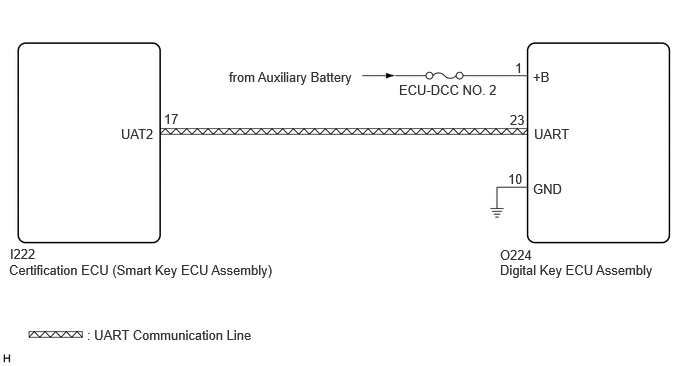
CAUTION / NOTICE / HINT
- NOTICE:
- ·
Before performing troubleshooting of the vehicle, refer to Precautions for Inspection or Registration to check for a cause of the malfunction which is not related to vehicle settings or vehicle components.
·Perform troubleshooting with the electrical key transmitter sub-assembly not inside the detection area of the smart entry and start system..
·Make sure that no DTCs are output. If any DTCs are output, proceed to Diagnostic Trouble Code Chart.
·If the digital key system has been disabled, enable the system before performing troubleshooting.
·Before replacing the certification ECU (smart key ECU assembly) or digital key ECU assembly, refer to Service Bulletin.
- HINT:
-
It is possible to check the digital key low battery warning history by using the GTS and reading the Vehicle Control History (RoB): Warning Operation History / Digital Key Low Battery Warning
PROCEDURE
Use the GTS and set the Start Indicator Function to ON.
- Entry & Start
-
Tester Display Description Default Setting ECU Start Indicator Function Function that turns the entry warning light on the combination meter assembly on or off. ON $00:OFF,$01:ON Certification ECU (Smart key ECU assembly) - 50006 17
Turn the ignition switch off.
Check that when all of the following conditions are met, the entry warning light is displayed on the multi-information display in the combination meter assembly.
The electrical key transmitter sub-assembly is inside the vehicle
The shift position is P
The brake pedal is depressed
- Result:
Proceed to OK NG
OK
NG
When the digital key battery voltage is low, start the hybrid control system.
- NOTICE:
- ·
Make sure there is no electronic device that outputs high-voltage or noise inside or around the vehicle.
·Make sure that the digital key is not covered by or touching a metal object.
·Discharge the battery of the digital key until the low battery voltage advice is displayed.
Check that the low battery voltage notification is displayed on the multi-information display in the combination meter assembly.
- OK:
Low battery voltage notification is displayed
- Result:
Proceed to OK NG
OK
NG
Using the GTS, check for Vehicle Control History (RoB).
- Body Electrical > Entry&Start > Utility
-
Tester Display Vehicle Control History (RoB) - 50005 440 62
Take appropriate action in accordance with the result of the cause analysis.
- Result:
Proceed to NEXT
NEXT
Check if there is digital key available that is already registered to the vehicle.
- Result:
Result Proceed to Another registered digital key is not available A Another registered digital key is available B
A
B
Check if another vehicle equipped with digital key system is available
- Result:
Result Proceed to Vehicle equipped with digital key system not available A Vehicle equipped with digital key system available B
A
B
Register a share key.
- HINT:
-
Refer to the digital key application.
- Result:
Proceed to NEXT
NEXT
Using another registered digital key with low battery voltage, start the hybrid control system.
- NOTICE:
- ·
Make sure there is no electronic device that outputs high-voltage or noise inside or around the vehicle.
·Make sure that the digital key is not covered by or touching a metal object.
·Discharge the battery of the digital key until the low battery voltage advice is displayed.
Check that the low battery voltage notification is displayed on the multi-information display in the combination meter assembly.
- OK:
Low battery voltage notification is displayed
- Result:
Proceed to OK NG
OK
NG
Using an oscilloscope, check the waveform.
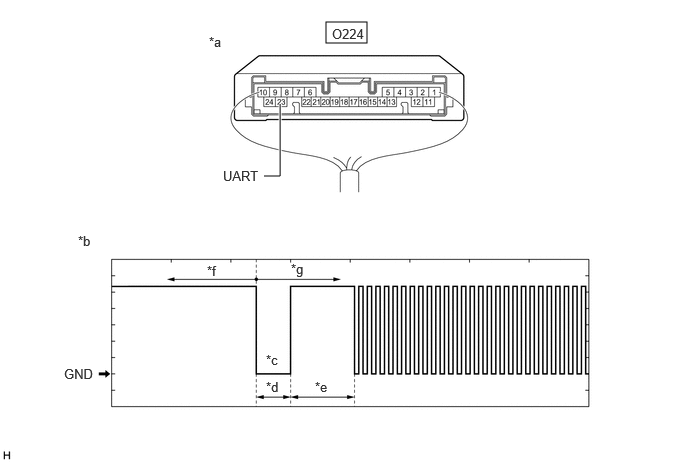
| *a | Component with harness connected
(Digital Key ECU Assembly) |
*b | Waveform |
| *c | Wakeup signal from digital key ECU assembly | *d | Approximately 15 ms. |
| *e | 15 to 50 ms. | *f | Before door lock/unlock operation using digital key |
| *g | After door lock/unlock operation using digital key | - | - |
- NOTICE:
-
The waveform shown in the illustration is an example for reference only. Noise, chattering, etc. are not shown.
- OK:
Tester Connection Condition Tool Setting Specified Condition O224-23 (UART) - Body ground All of the following conditions are met:
·Ignition switch off
·Door lock/unlock operation has been not performed via digital key → performed
2 V/DIV., 20 ms./DIV. Pulse generation
(See waveform)
- Result:
Result Proceed to OK (Normal Waveform) A NG (No Wakeup Signal) B NG (Normal Waveform Not Output) C NG (Stuck Low) D
A
B
C
D
Replace the digital key ECU assembly with a new one.
- HINT:
-
Refer to Service Bulletin.
- Result:
Proceed to NEXT
NEXT
Register the digital key code to the digital key ECU assembly.
- HINT:
-
Refer to Service Bulletin.
- Result:
Proceed to NEXT
NEXT
Register the owner key using the original digital key.
- HINT:
-
Refer to the digital key application.
- Result:
Proceed to NEXT
NEXT
Using a newly registered digital key with low battery voltage, start the hybrid control system.
- NOTICE:
- ·
Make sure there is no electronic device that outputs high-voltage or noise inside or around the vehicle.
·Make sure that the digital key is not covered by or touching a metal object.
·Discharge the battery of the digital key until the low battery voltage advice is displayed.
Check that the low battery voltage notification is displayed on the multi-information display in the combination meter assembly.
- OK:
Low battery voltage notification is displayed
- Result:
Proceed to OK NG
OK
NG
Disconnect the O224 digital key ECU assembly connector.
Measure the voltage according to the value(s) in the table below.
- Standard Voltage:
Tester Connection Condition Specified Condition O224-23 (UART) - Body ground Ignition switch off 11 to 14 V
- Result:
Proceed to OK NG
OK
NG
Register the digital key with which the power source mode could not be changed to another vehicle equipped with a digital key system as the share key.
- HINT:
-
Refer to the digital key application.
- Result:
Proceed to NEXT
NEXT
Use another vehicle equipped with the digital key system, and start the hybrid control system when the digital key battery voltage is low.
- NOTICE:
- ·
Make sure there is no electronic device that outputs high-voltage or noise inside or around the vehicle.
·Make sure that the digital key is not covered by or touching a metal object.
·Discharge the battery of the digital key until the low battery voltage advice is displayed.
Check that the low battery voltage notification is displayed on the multi-information display in the combination meter assembly.
- OK:
Low battery voltage notification is displayed
- Result:
Proceed to OK NG
OK
NG