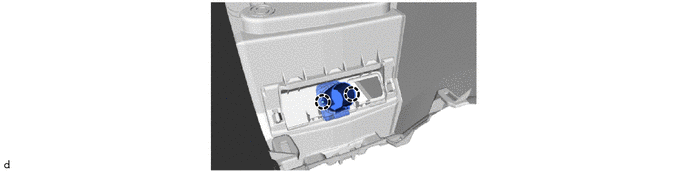
RM38T0EC
_58
Vehicle Interior
_112290
POWER OUTLETS (INT)
_0501083
POWER OUTLET SOCKET
A
POWER OUTLETS (INT) POWER OUTLET SOCKET REMOVAL
CAUTION / NOTICE / HINT
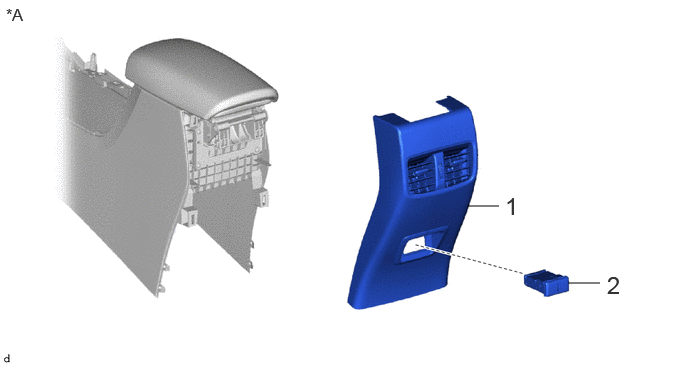
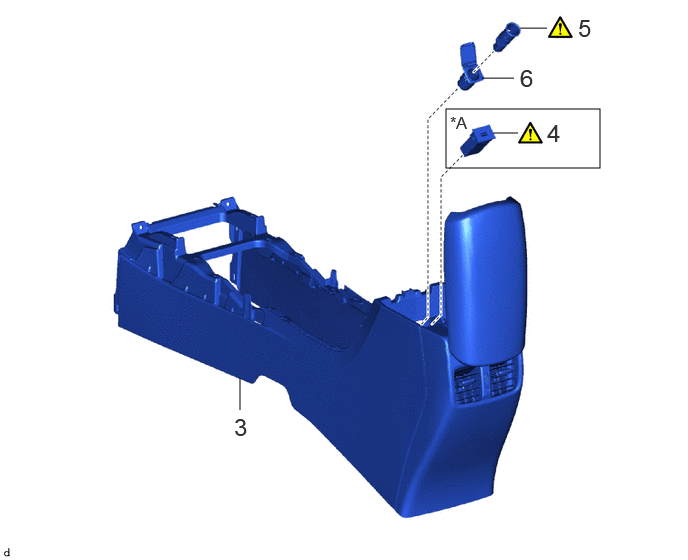
COMPONENTS (REMOVAL)
4.865,2.146 5.198,2.146
false
5.917,2.948 6.25,2.948
false
5.26,2 5.542,2.354
0.281,0.354
18
false
1
6.323,2.823 6.604,3.177
0.281,0.354
18
false
2
0.063,0.052 0.438,0.292
0.375,0.24
12
false
*A
| Procedure | Part Name Code | 
|

|

|
|
|---|---|---|---|---|---|
| 1 | CONSOLE REAR END PANEL SUB-ASSEMBLY | 58903A | - | - | - |
| 2 | NO. 2 USB CHARGER SOCKET | 85532C | - | - | - |
| *A | for USB Double Charger Socket | - | - |
4.646,1.135 6.25,1.75
1.604,0.615
2.5,4.271 2.5,3.938
false
5.135,1.385 5.396,1.385
false
5.021,0.813 5.354,0.813
false
5.417,0.292 5.698,0.292
false
2.438,4.302 2.719,4.656
0.281,0.354
18
false
3
5.698,1.24 5.979,1.594
0.281,0.354
18
false
4
6.021,0.146 6.302,0.5
0.281,0.354
18
false
5
5.417,0.667 5.698,1.021
0.281,0.354
18
false
6
4.688,1.177 5.063,1.417
0.375,0.24
12
false
*A
| Procedure | Part Name Code |
|
|
|
|
|---|---|---|---|---|---|
| 3 | CONSOLE BOX ASSEMBLY | 58810J | - | - | - |
| 4 | USB CHARGER SOCKET | 85532 | ( 202201,999999,_58,_112290,_0501083,RM100000001Z4VB_01_0042,) 202201,999999,_58,_112290,_0501083,RM100000001Z4VB_01_0042,)
|
- | - |
| 5 | NO. 1 POWER OUTLET SOCKET ASSEMBLY | 85530 | (202201,999999,_58,_112290,_0501083,RM100000001Z4VB_01_0031,)
|
- | - |
| 6 | NO. 1 POWER OUTLET SOCKET COVER | 85535B | - | - | - |
| *A | for USB Single Charger Socket | - | - |
PROCEDURE

 58903A
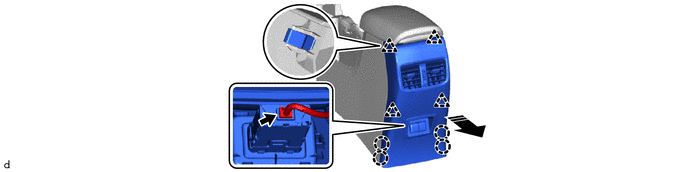
1.REMOVE CONSOLE REAR END PANEL SUB-ASSEMBLY (for USB Double Charger Socket)
58903A
1.REMOVE CONSOLE REAR END PANEL SUB-ASSEMBLY (for USB Double Charger Socket)
a.
0,0 0,0
false

|
Remove in this Direction | - | - |
85532C
2.REMOVE NO. 2 USB CHARGER SOCKET (for USB Double Charger Socket)
a.
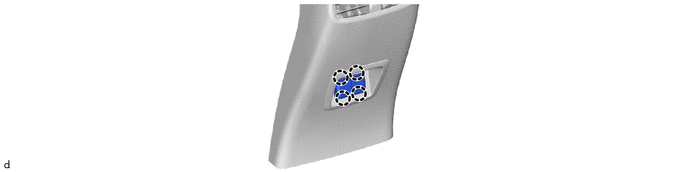
58810J
3.REMOVE CONSOLE BOX ASSEMBLY
85532
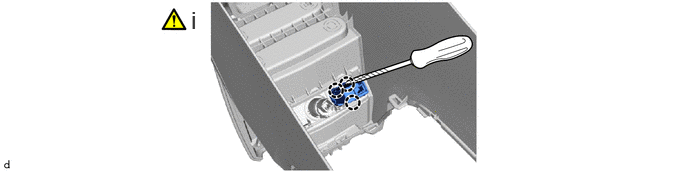
4.REMOVE USB CHARGER SOCKET (for USB Single Charger Socket)
a.
1.99,0.063 2.271,0.417
0.281,0.354
18
false
i
i.
Using a screwdriver with its tip wrapped with protective tape, disengage the claws to remove the USB charger socket.
85530
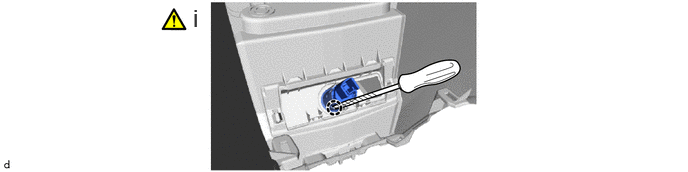
5.REMOVE NO. 1 POWER OUTLET SOCKET ASSEMBLY
a.
2.01,0.042 2.292,0.396
0.281,0.354
18
false
i
i.
Using a screwdriver with its tip wrapped with protective tape, disengage the claw to remove the No. 1 power outlet socket assembly.
85535B
6.REMOVE NO. 1 POWER OUTLET SOCKET COVER
a.