☰ Toyota Frontlander☰ فهرستVehicle Interior › LIGHTING (INT) › INTERIOR ILLUMINATION LIGHT(for Console Box)
RM38T0EC
_58
Vehicle Interior
_112288
LIGHTING (INT)
_0501075
INTERIOR ILLUMINATION LIGHT(for Console Box)
G
LIGHTING (INT) INTERIOR ILLUMINATION LIGHT(for Console Box) INSPECTION
PROCEDURE

 58827A
1.INSPECT CONSOLE BOX POCKET GARNISH
58827A
1.INSPECT CONSOLE BOX POCKET GARNISH
a.
Check the illumination.
i.
1.5,0.167 1.917,0.417
0.417,0.25
1.333,1.917 1.583,1.25
true
2.083,1.917 1.833,1.25
true
0.188,0.167 0.5,0.323
0.313,0.156
10
false
*a
1.25,1.917 1.406,2.115
0.156,0.198
10
false
B
2.094,1.917 2.25,2.115
0.156,0.198
10
false
E
1.594,0.208 2.052,0.406
0.458,0.198
10
false
I226
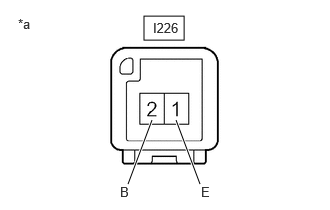
| *a | Component without harness connected
(Console Box Pocket Garnish) |
Apply auxiliary battery voltage to the console box pocket garnish and check that the light illuminates.
- OK:
Tester Connection Specified Condition I226-2 (B) - Auxiliary battery positive (+)
I226-1 (E) - Auxiliary battery negative (-)Console box pocket garnish illuminates
If the result is not as specified, replace the console box pocket garnish.